USPS Form 1583
USPS Form 1583
USPS Form 1583 is required by the United States Postal Service to authorize PostScan Mail to receive and manage your mail on your behalf.
The fastest way to complete this form is using our online wizard, which guides you step by step and allows you to connect with an online notary for quick submission.
What is the USPS Form 1583?
The United States Postal Service (USPS) regulates how mail can be received and handled. As a Commercial Mail Receiving Agency (CMRA), PostScan Mail is required to collect a notarized USPS Form 1583 for each customer.
This form authorizes us to receive and process your mail securely.
USPS Form 1583
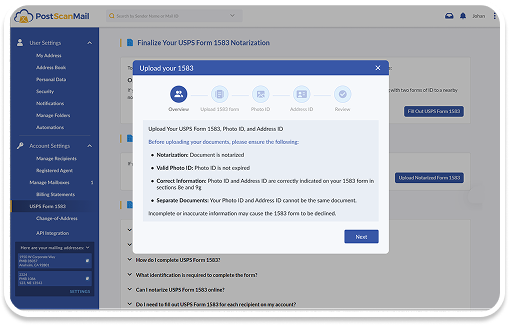
The easiest and quickest way to complete USPS Form 1583 is through our online wizard.
With the wizard, you can fill out the form step by step, download a PDF if needed, connect with an online notary, and submit your form automatically.
You can access the USPS Form 1583 wizard in your account under Settings > Account Settings > USPS Form 1583.
Notarize Your USPS Form 1583
To activate your account, your USPS Form 1583 must be notarized.
You can complete notarization in one of two ways.
Online notary (recommended)
Complete the process quickly through your webcam. Once notarized, your form will be submitted automatically.

Local notary
Visit a nearby notary. After notarization, upload the completed form to your account.
Send USPS Form 1583 to PostScan Mail
Once your form is completed and notarized, you can submit it in one of the following ways.

Upload online:
Sign in to your PostScan Mail account to upload your completed and notarized USPS Form 1583.
-
Online notary:
If you used our online notary, your form will be submitted automatically.
-
In person:
Bring your completed form and ID to your local PostScan Mail location. Some locations may also offer notarization services.


List of Acceptable IDs
To complete USPS Form 1583, you must provide two forms of identification.
You will need one photo ID and one address ID. All IDs must be current and unexpired.
Accepted photo IDs include U.S. Driver’s License or State ID, passport (U.S. or foreign), permanent resident card, military ID, university ID, and NEXUS card.
Accepted address IDs include driver’s license or state ID, lease agreement, insurance policy, voter or vehicle registration, and mortgage or deed.
Social Security cards, credit cards, and birth certificates are not accepted.
Change of Address
To begin receiving mail, you will need to update your mailing address with your senders or submit a Change-of-Address request with USPS.
You can submit a Change-of-Address request online through USPS or notify your senders of your new PostScan Mail address. USPS mail forwarding is temporary, so it is important to update your address with all senders.


You’re Done
Once your USPS Form 1583 is completed, notarized, and submitted, your account will be ready to receive mail.
If you have any questions, please contact us at 1-800-624-5866 or support@postscanmail.com.
Securely receive your mail and package deliveries
Choose from 1,000+ locations across the United States and internationally.