To manage holiday mail delays, check whether your item is still with the sender or carrier, waiting for mailbox processing, or awaiting an instruction in your account. The next action depends on that stage.
Mail scanning lets you read a document after staff receives, opens, and scans it. Mail forwarding sends the original to another address and adds preparation and transit time. Neither service removes delays that occur before the item reaches your mailbox.
This guide covers U.S. mail and packages received through a virtual mailbox, including items forwarded onward.
Find the stage that is delayed
Compare the sender’s record, carrier tracking, and your mailbox account before requesting help. A carrier delivery record and an uploaded mailbox image describe different events. Staff still need to identify and process a received item.
| Where the item is waiting | Record to check | Next action |
|---|---|---|
| With the sender or inbound carrier | Mailing date, service, tracking, and destination | Ask the sender to confirm dispatch and review the carrier’s latest update |
| Marked delivered but absent from your account | Delivery time, address, recipient name, and mailbox number | Ask the receiving location to check intake and item matching |
| In your account with a content scan pending | Mail ID, request ID, submission time, and status | Ask the location when it expects to complete the request |
| Awaiting forwarding preparation or pickup | Shipment request, item list, instructions, and handoff status | Confirm what remains before the location releases the shipment |
| With the outbound carrier | New tracking number, service, and last event | Follow the carrier’s instructions for that shipment |
During transit, check disruptions for the actual route. UPS service alerts and FedEx service alerts identify conditions that may affect their services. An alert can explain a possible disruption; the tracking record provides information about your item.
Avoid opening several support requests with different descriptions of the same item. Keep one record of the latest status, the action requested, and the person or team handling it.
Use content scans when you need the information
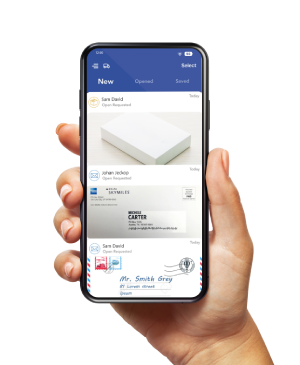
A content scan can let you read a received letter without waiting for another physical shipment. PostScan Mail’s mail scanning service lets you request opening and scanning through your account.
An envelope image shows the outside. To read the enclosed document, submit an open-and-scan request or check whether one is already in progress. Allow for the location’s processing schedule and review the completed file for missing or unreadable pages.
If a deadline is approaching and the letter has not arrived, contact the sender about a digital copy or replacement.
A mailbox operator cannot scan a document it has not received.
For example, a business owner may need the information in a supplier’s letter while traveling.
If a content scan meets that need, the owner can read it while the original remains stored.
If the recipient needs the original document, forwarding still requires a physical shipment. Confirm what the receiving party accepts before relying on a scan.
Submit forwarding requests around the full route
Plan for preparation, carrier pickup, and transit. A carrier’s advertised delivery time does not establish when a mailbox location can prepare your item.
Use this sequence before submitting a request.
- Confirm the arrival requirement.
Identify the date you need the original and whether someone at the destination can receive it. If you are traveling, check the accommodation’s acceptance rules and your departure date. - Check the item list.
Confirm which letters or packages have arrived and which you want to send. Decide whether waiting for another item would put the deadline at risk. - Ask the holding location about preparation.
Confirm its request cutoff, operating days, processing time, and next carrier pickup. Use the location’s time zone when discussing a deadline. - Compare the shipment options.
Check the service for the origin and destination, packaging requirements, total cost, and any required international documentation. Use the PostScan Mail shipping calculator to estimate costs and confirm what it includes. - Submit complete instructions and follow the handoff.
Review the address, recipient, selected items, service, and any payment or documentation requirements. Save the request ID and use the new tracking number when the shipment enters the carrier’s network.
The holiday shipping deadline guide covers carrier ship-by dates and route conditions. Work backward from the applicable carrier cutoff to allow time for the location to prepare.
A request submitted on the carrier’s last shipping day may leave no time for that work.
Decide whether to wait for consolidation
Compare the cost and timing before combining items. A gift already at the mailbox and another parcel still in transit have different readiness dates.
Holding the first for the second may reduce the time it takes to reach the recipient.
Ask for the available shipping options and any storage or handling charges. If the ready item has a deadline, consider sending it separately while you wait for the other parcel.
Base that decision on the quote and arrival requirement.
Escalate a delay with the records needed to investigate
For a carrier delay, save the mailing receipt or dispatch record, tracking number, service, addresses, and latest tracking event.
Ask the sender for details you do not have. For a mailbox processing delay, include the account’s mail or shipment ID, the request time, and the destination or scan you need.
If tracking says delivered but the account has no matching item, send the location, the delivery evidence, and the exact name and address on the label.
Ask it to check the receipt and match it before treating the parcel as lost. Carrier delivery confirmation alone does not prove the provider completed its intake work.
For USPS items that remain missing, follow the USPS Missing Mail process. Start by checking the current status and gathering the information needed for a search.
Search, insurance, and postage-refund procedures serve different purposes and have their own conditions.
If an original is unlikely to meet your deadline, contact the sender or intended recipient about an alternative while the investigation continues.
Confirm any agreed replacement or deadline arrangement in writing.
Remove avoidable setup and scheduling delays
Before sending holiday mail to a new address, activate your account and complete the required verification.
Review the USPS Form 1583 setup guidance for receiving USPS mail through a U.S. mailbox service.
Provide senders with the approved recipient name and complete address, including the mailbox identifier.
Confirm the selected location accepts the items you expect.
Ask about physical storage charges, processing days, pickup arrangements, and how to contact staff. Online access and on-site handling follow different schedules. The holiday closure guide explains what you can do online while physical work waits for the location to reopen.
For a team account, assign someone to review arrivals and pending requests while you’re away.
Record who will act on a letter that needs a response. A notification helps only when someone checks it and takes the required action.
Choose the next action for the item you need
Find the last confirmed stage first. Request a content scan when you need access to the information. Arrange forwarding when you need the original, allowing time to prepare and for the next leg of the journey.
Review PostScan Mail’s mail forwarding options and confirm the schedule at the location holding your item. Use its handling estimate together with the carrier’s route estimate before choosing a service.
Access & Manage Your Postal Mail
Anywhere Anytime!
Receive mail anywhere, on any device.
We offer 1000+ mailing addresses for both personal and business use.