Prepare Black Friday shipping and returns by setting dispatch promises your team can meet, confirming carrier handoffs, and testing how returned packages will move from receipt to refund. Give each stage an owner. A parcel notification helps your team locate a return, but it does not confirm the item’s condition or complete the customer’s refund.
For 2026, Black Friday falls on November 27 and Cyber Monday on November 30. Plan beyond that weekend so your team can handle returns within your published policy.
This guide focuses on US ecommerce sellers, including remote teams using a separate return address.
Table of Contents
Set shipping promises around the whole order journey
Your checkout estimate needs to account for order processing and carrier transit. A carrier’s transit estimate doesn’t include the time an order spends waiting for your team to pick, pack, and hand it over.
Before promoting delivery dates, confirm stock, packing capacity, pickup times, and service availability for the origin and destination. Check holiday schedules for the warehouse or mail location as well as the carrier. Online account access does not mean physical handling continues during a closure.
Use your latest verified carrier handoff date to work backward through your fulfillment time and any route buffer. State the order cutoff’s time zone. If you sell a faster shipping option, explain whether it changes carrier transit, order processing, or both.
For example, an order that needs two business days of processing before a three-business-day carrier service should not appear as a three-business-day total delivery promise. Those figures illustrate the distinction; they are not carrier estimates.
Under the FTC’s merchandise shipping rule, sellers must have a reasonable basis for a promised shipment time. For covered orders with no shipment time stated, the general rule is shipment within 30 days. If you cannot meet the applicable time, follow the rule’s delay-consent or refund requirements. A routine tracking email does not replace that process.
Keep dispatch and delivery language distinct throughout product pages, checkout, confirmation emails, and support replies.
Confirm carrier handoff before reporting an order as shipped
A label gives you a tracking number. It doesn’t confirm the carrier has the parcel. UPS explains that Label Created means it has received shipment details and billing information; possession and movement follow later.
Use a handoff record, pickup documentation, and available carrier scans to investigate gaps. If a label exists but the parcel has not left your facility, resolve the warehouse or pickup issue before telling the customer the delay is in transit.
Prepare one support response for each situation. Tell customers what you have verified, what action you are taking, and when you will update them. Avoid assigning a new arrival date without checking the route and service.
Publish a return policy your team can carry out
Put the policy where shoppers can find it before purchase. Make the terms match your checkout, marketplace settings, and support instructions.
Explain the return window and when it starts, product eligibility, item-condition requirements, and any exclusions. State who pays return shipping, how customers request authorization, and how exchanges or refunds proceed. Distinguish your processing time from the time a payment provider takes to post a refund.
If you extend the window for holiday gifts, write the dates and exceptions explicitly. Plan receiving, storage, and review capacity through that period rather than ending staffing when the promotion ends.
A store policy must also account for applicable consumer law and marketplace requirements. Do not assume a final-sale label resolves every damaged, incorrect, or otherwise disputed order.
Test the return address before changing store settings
A useful return address needs to support the parcels and handling you expect. Confirm the selected PostScan Mail location can accept your items and expected volume before publishing it to customers.
Ask about carrier acceptance, parcel size and weight limits, signature requirements, holiday hours, processing times, and storage charges. Check whether the operator can provide the particular photos, document scans, or other handling your workflow requires. Product inspection needs its own confirmation.
PostScan Mail’s service terms qualify restricted and signature-required deliveries. They also require advance facility confirmation for perishable or temperature-sensitive items and do not guarantee controlled-temperature storage. Match the service to your product category before routing returns there.
For US locations operating as commercial mail receiving agencies, complete the required USPS Form 1583 authorization and identity-verification process before redirecting mail. Confirm the approved recipient name and exact address format, including the mailbox designation.
Update the return address field only after testing. Your marketplace may treat a return address, business verification address, and fulfillment origin differently. Check the purpose of each field instead of replacing every address with the mailbox location.
Use a return workflow that ends with a recorded decision
Returns management is the process of moving a customer’s return request through authorization, transport, receipt, review, and resolution. Keep those stages visible even if one company performs several of them.
1. Create a return record tied to the order
Record the order number, product or SKU, quantity, return reason, and customer contact. Give the customer an authorization reference when your process uses one. Include packing and labeling instructions that the receiving location has agreed to support.
Do not put payment details or unnecessary personal information on the parcel. Decide how staff will match a package to the order if the customer leaves out the paperwork.
2. Track the parcel and record physical receipt
Keep the return tracking number with the order. Record carrier delivery and the receiving location’s intake status separately so a delivered-but-unmatched parcel remains visible for follow-up.
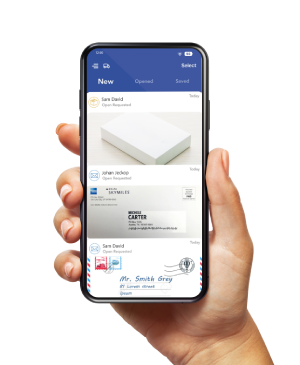
PostScan Mail’s returns and reshipping service lets you receive returned parcels and request available handling through an online account. Confirm the chosen facility’s services and turnaround. An exterior package image can help identify the parcel; it does not verify the contents or prove that a product works.
3. Arrange inspection and choose the disposition
Assign someone to check the returned item against the expected SKU, quantity, and applicable condition criteria. If the receiving service does not provide that inspection, arrange forwarding to the team or facility that does.
Record the decision for each item. It may return to saleable stock, go back to the supplier, require further review, or need another approved disposition. Keep items awaiting review out of inventory offered as ready to sell.
4. Complete the customer and inventory actions
Issue the refund or handle the exchange according to the policy, platform requirements, and applicable law. Record the amount, date, and transaction reference. Update inventory only for items approved for that stock location and condition.
Shopify’s returns documentation treats processing, refunding, restocking, and exchange fulfillment as distinct actions. Use your platform’s controls to verify each action rather than assuming receipt triggers all of them.
Send the customer confirmation of the action taken. A message that says you received a parcel should not imply you have already refunded the payment.
5. Close the physical handling task
Finish any approved forwarding, pickup, storage, or disposition request. Retain the order-to-package link and relevant evidence, so support staff can explain what happened without searching separate inboxes.
Use this handoff table to assign responsibility. It describes a suggested merchant workflow, not features included in every mailbox plan.
| Stage | Owner to assign | Record before moving on |
|---|---|---|
| Return authorized | Customer support | Order reference, expected items, instructions, and return tracking |
| Package received | Receiving location and merchant contact | Intake reference and a match to the return record |
| Item reviewed | Merchant or agreed inspection provider | Quantity, condition, and disposition decision |
| Customer resolved | Refund or exchange operator | Transaction reference or exchange order details |
| Goods routed | Warehouse or handling coordinator | Stock update, forwarding record, or approved disposition |
Budget for each handling step and each day in storage
Compare the cost of the complete return route, not just the mailbox subscription or return label. Your route may include customer-to-location postage, receiving overages, requested handling, storage, forwarding, and a second shipment to your warehouse.
Review the selected location’s plan allowances and additional fees. Check when storage charges start and how package weight or size affects costs. Document scans and product inspection are different services, so ask what each quote covers.
If you plan to consolidate parcels, compare the combined quote with separate shipments. Include handling charges, packaging, dimensions, and the cost of waiting for the batch. Consolidation may help, but waiting can add storage costs or delay inspection. Avoid counting a handling charge twice if a quote already includes it.
Use the shipping calculator to estimate forwarding from the selected PostScan Mail origin. Confirm the final service, parcel details, and charges before authorizing shipment. An estimate does not reserve a pickup or guarantee delivery.
Test the process before Black Friday
Run a test parcel through the route your customers will use. Check the label, receipt notification, order matching, requested handling, and forwarding to the next facility. Then test the merchant-side refund or exchange steps in an appropriate test environment or controlled transaction.
Measure the time between stages. Use the result to set your own service targets without treating one test as a guarantee for every parcel.
| Planning period | Work to complete | Evidence to keep |
|---|---|---|
| Before promotions launch | Confirm capacity, product acceptance, shipping promises, and return terms | Written operating details and a completed route test |
| During the sale | Review unshipped orders, pickup gaps, and customer exceptions | Handoff records and assigned support cases |
| As returns arrive | Match packages, inspect items, resolve customer issues, and route goods | Return records linked to decisions and transactions |
| After the return window | Reconcile unresolved cases, charges, and inventory | Final costs and changes to make before the next promotion |
Keep checking the physical workload. In a hypothetical operation receiving 30 returns per working day while reviewing 20, the unreviewed queue grows by 10 each day. After four such days, it has added 40 items. This is arithmetic for planning, not a forecast or an industry return rate.
Use your actual intake and review counts to decide whether to add inspection capacity, increase forwarding frequency, or revise customer processing estimates. Monitor the oldest unresolved return and the total count.
Keep the store and the receiving service connected
A virtual mailbox helps your team manage incoming parcels. Your store still owns customer and inventory decisions. Explore PostScan Mail’s returns service, confirm the location’s handling and capacity, and test the route before changing customer instructions. Assign an owner to every stage.
Access & Manage Your Postal Mail
Anywhere Anytime!
Receive mail anywhere, on any device.
We offer 1000+ mailing addresses for both personal and business use.