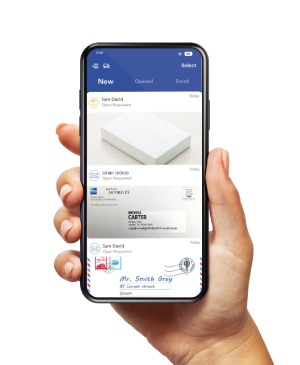
Before a holiday trip, arrange a receiving plan for your home or office, confirm your virtual mailbox is ready, and decide who will review time-sensitive correspondence.
Request any originals you need early enough to allow for handling, carrier pickup, and transit.
A virtual mailbox lets you review uploaded mail images and request actions remotely.
Staff and carriers still need to handle physical letters and packages. Use this holiday mail checklist to organize what happens before departure, while you are away, and after you return.
Choose How to Handle Mail at Your Usual Address
To ensure all your mail and packages arrive reliably during a trip, list any deliveries that will still go directly to your home or office, as a virtual mailbox only manages items sent to its specific receiving address.
Depending on your needs, you can set up a USPS Hold Mail service for short trips lasting 3 to 30 days by checking address eligibility, completing online verification, and selecting your start and end dates.
Alternatively, you can arrange temporary USPS mail forwarding to redirect eligible mail to another location, or rely on a virtual mailbox to review and request handling of your mail online once you activate your account and set up local services.
Keep in mind that a USPS hold or virtual mailbox does not cover third-party carriers, so you will need to make separate arrangements for UPS, FedEx, retailer deliveries, and recurring orders, though you can easily combine a home mail hold with a virtual mailbox service for comprehensive coverage.
Before You Leave
- Confirm the receiving plan.
Record departure and return dates, office closures, local collection arrangements, and any orders already in transit. Check saved shipping addresses and subscriptions before placing new orders. - Activate and test the mailbox.
Complete identity verification and USPS Form 1583 when required for receiving USPS mail at a U.S. location. Follow the provider’s instructions for current identification and signature verification. Confirm approval and a successful test delivery before relying on the service. - Give senders the complete address.
Include the authorized recipient name and assigned private mailbox identifier. Notify important senders directly. Form 1583 authorizes mail receipt; it does not move mail from your old address. If using USPS forwarding, allow its separate setup time. - Clear urgent correspondence.
Review available items and request content scans for letters that need attention. Identify any original documents you must keep or receive physically. Record due dates and, when possible, arrange the necessary response before leaving. - Check local hours, handling times, and charges.
Ask about holiday receiving, scanning, pickup, packing, and dispatch. Review scan allowances, letter and package storage windows, forwarding fees, and postage. Confirm the selected location and billing term rather than assuming all plans include the same allowances. - Test access and assign responsibility.
Check login, recovery details, alerts, and two-factor authentication. For business mail, name a reviewer and backup, confirm their authorized access, and record the local provider’s contact details. Keep downloaded documents in your approved storage system.
An envelope preview tells you who sent a letter, not what the letter says. Request opening and scanning when you need the contents, then allow time to review the completed scan. Keep a task open until you have the information or confirmation needed to act.
Use the Correct 2026 USPS Holiday Shipping Dates
For expected delivery before December 25, USPS publishes these recommended send-by dates for the contiguous United States. They exclude Alaska, Hawaii, Puerto Rico, other U.S. territories, international routes, and military or diplomatic addresses.
| USPS Service | 2026 Recommended Send-By Date |
| Ground Advantage | Thursday, December 17 |
| First-Class Mail | Thursday, December 17 |
| Priority Mail | Friday, December 18 |
| Priority Mail Express | Saturday, December 19 |
Check the official USPS holiday shipping dates for your route and service. Actual arrival can vary with origin, destination, acceptance time, and other conditions; a recommended date is not a universal delivery guarantee.
These are carrier send-by dates, not the deadline for submitting a mailbox request. Work backward from the recipient’s required arrival date and ask your mailbox location when it needs your instructions. Include processing, packing, the next carrier pickup, transit, and the recipient’s availability.
If you are considering consolidation, compare the total quote and timing with separate shipments. Waiting for another parcel or repackaging several items can affect both dispatch and storage charges. Confirm the actual preparation schedule before choosing that option.
While You Are Away: Review, Act, and Confirm
- Review the contents you requested.
Check completed scans on a schedule that fits your needs. Record the action required, the responsible person, and the due date. Contact the sender if instructions or deadlines are unclear. - Follow physical requests through completion.
Check scanning, forwarding, and pickup status. For a shipment, save the destination, service, tracking number, and handoff confirmation. Contact the location promptly if your plans change before you complete a request. - Monitor stored items and changes to delivery plans.
Review remaining storage time, expected arrivals, and the address where you can actually receive a parcel. Arrange pickup, forwarding, or appropriate disposal before avoidable charges accumulate. - Verify delivery messages directly.
Open the carrier’s official app or website to check tracking. The U.S. Postal Inspection Service warns about unexpected package texts that seek personal information or payment. Verify a message before following an unfamiliar link.
During a facility closure, you may still review documents already uploaded to your account. New content scans, repackaging, collection, and dispatch depend on physical operations and carrier schedules. Online access does not mean we process every handling request immediately.
When You Return: Finish the Mail Plan
- Resume collection as arranged.
Follow the end-of-hold or forwarding instructions you selected. Collect local mail and parcels, and compare expected deliveries with what arrived. Contact the sender or receiving location about items that remain unaccounted for. - Sort physical originals.
Keep documents needed for transactions, returns, claims, or recordkeeping. Arrange collection or forwarding of retained items and request suitable disposal for unwanted mail. Review any storage charges still accruing. - Close remaining actions.
Confirm shipment outcomes, completed scans, responses, and support requests. Remove travel-specific delivery instructions and review account access. Save the records you need before archiving finished tasks.
Make Your Holiday Mail Plan Practical
Your plan should cover both incoming mail and the decisions it creates. Choose a receiving arrangement that fits your trip, allow realistic handling time, and keep responsibility clear until you resolve each important item.
Explore PostScan Mail’s virtual mailbox service if you need ongoing remote review and mail handling as requested. Confirm verification, local holiday hours, package acceptance, storage, and fees with your selected location before redirecting important correspondence.
Access & Manage Your Postal Mail
Anywhere Anytime!
Receive mail anywhere, on any device.
We offer 1000+ mailing addresses for both personal and business use.