A mail scanning service lets you read eligible postal mail online after the provider receives it and scans the contents.
Its main advantages are remote access, easier sorting, fewer unnecessary forwarding requests, and digital copies you can organize and share.
The distinction matters: an image of an envelope shows what arrived. An open-and-scan request lets you read what is inside.
Neither turns postal mail into instant email or removes the need to keep certain originals.
What is a mail scanning service?
A mail scanning service converts physical letters and documents into digital images or files.
It is often part of a virtual mailbox, where a provider receives your mail and lets you request actions online.
There are two separate stages:
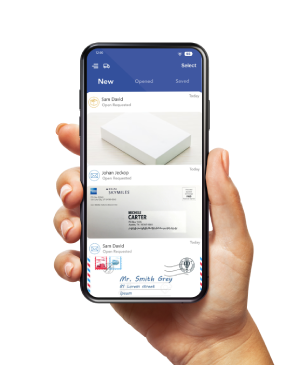
- Envelope scanning: an image of the outside helps you identify the sender and decide what to do next.
- Content scanning: the provider opens authorized items and scans the enclosed pages so you can read them online.
PostScan Mail’s scanning service supports requesting content scans for remote viewing and downloading. Check the chosen location’s capabilities and current terms, rather than assuming every item or request is treated the same.
How does mail scanning work?
The process starts with physical delivery, then the provider processes it, and you follow your handling instructions.
- Choose a receiving address and plan.
Check the accepted mail, recipient allowances, scanning options, and charges. - Complete the required authorization and identity checks.
For USPS delivery through a commercial mail receiving agency, or CMRA, USPS requires Form 1583 and acceptable identification under its CMRA rules. - Have mail sent to the address.
Update senders or arrange eligible forwarding as appropriate. Follow the provider’s exact address format. - Review the uploaded envelope image.
Decide whether to request a content scan, keep the item unopened, forward it, or dispose of it. - Read the completed scan.
Check all pages, download what you need, and arrange the original’s next step.
PostScan Mail’s USPS Form 1583 guide explains how to set it up.
Authorizing receipt of mail and choosing which items to open are related but separate parts of the workflow; review your service agreement and account preferences.
Keep three events separate: carrier delivery, envelope-image upload, and completed content scanning.
An item marked delivered by the carrier may still be awaiting processing. Ask how weekends, holidays, request cutoffs, and backlogs affect your selected location.
6 benefits of a mail scanning service
1. Read postal mail while you are away
You can review a completed scan without returning to the receiving address or waiting for the original to be shipped to you.
This can help frequent travelers, RV owners, expats, and people working away from home.
For example, a consultant on a two-week trip could request a scan of a supplier letter and read it online once processing is complete.
If a reply is needed, the consultant can start preparing it while deciding whether to forward the original.
This is a practical example, not a promise of a particular turnaround time. Scanning does not speed up the letter’s initial journey to the provider.
2. Decide what needs attention before opening everything
Envelope images give you a starting point for sorting incoming mail.
You can request the contents of a letter you need to read and leave an item unopened when the physical version matters.
That choice can reduce unnecessary scan requests.
It also gives you a repeatable routine: review, choose an action, and track anything that remains pending.
An envelope is only a preview. A familiar sender may send an important notice, and an unfamiliar sender may send legitimate correspondence. Do not discard a letter solely because it looks unimportant from the outside.
3. Forward fewer items when a digital copy is enough
Scanning may remove the need to ship some documents to your current location. You can reserve physical forwarding for items you actually need in hand.
Savings depend on your mail volume, scanning charges, shipping costs, and whether you need originals.
If you request scans of every page and still forward everything, the service may cost more than it saves.
Consider a hypothetical month with 60 incoming envelopes. You choose 12 for content scanning, and each contains five pages.
That means 60 received items, 12 open-and-scan requests, and 60 scanned pages. These are different billing measures, even though two totals happen to match.
Compare the plan’s allowances for each measure separately. Do not assume an incoming-item allowance includes the same number of content scans.
4. Keep digital copies organized and easier to share
Downloadable scans can fit into the document system you already use for correspondence, invoices, and other records.
Name files consistently and share the relevant copy with an authorized colleague or accountant.
A practical filename is 2026-10-28_SupplierName_Invoice123.pdf. Store it in the appropriate folder and record any action required.
A file saved to a mailbox is not automatically entered into your accounting software or assigned to a team member.
Check the scan before relying on it. Confirm that every page is present and readable, including reverse sides with information.
Protect downloaded copies as carefully as the files the provider still holds.
5. Reduce paper piles in your home or office
A scanning workflow can help you decide what to keep, forward, or destroy before a stack of letters builds up at your workplace.
The paper still exists after scanning unless you authorize its disposal or the provider applies an agreed retention policy.
Digital storage and physical storage are different services.
Use a clear rule: read first, confirm whether an original is needed, then choose its disposition.
Scanning alone does not make every document safe to destroy or an acceptable replacement for the original.
6. Make receipt and disposal more deliberate
A mail receiving location can be an alternative to leaving correspondence in a home mailbox while you are away.
Online handling requests can also make disposal a conscious decision rather than leaving sensitive papers in a pile.
Security still depends on the provider, the location, and your own account practices. Staff may need to handle and view a document to scan it.
Digital access introduces responsibilities for passwords, permissions, devices, and downloaded files.
The FTC’s guidance on protecting personal information recommends assessing service providers’ security practices and properly disposing of sensitive records.
Ask about access controls, retention, incident procedures, and shredding rather than accepting a blanket security promise.
Mail scanning versus USPS Informed Delivery
A mail scanning service can provide the contents of authorized letters. USPS Informed Delivery previews incoming mail and package information.
USPS Informed Delivery is free for eligible customers and shows grayscale images of the address side of incoming letter-sized mail. It does not open letters and scan their enclosed pages for you.
| Service | What you can see | Who handles the original |
|---|---|---|
| USPS Informed Delivery | Preview images of eligible mail exteriors and package updates. | Mail continues through the normal delivery process. |
| Mail scanning through a virtual mailbox | Envelope images and content scans, based on your authorization and the service’s scope. | The receiving provider holds, forwards, or disposes of items under your instructions and its terms. |
If you only want to know what is arriving at your existing eligible address, Informed Delivery may meet that need.
If you need someone to receive mail and provide readable copies of its contents while you are elsewhere, a scanning service addresses a different need.
When to scan, forward, hold, or shred
Choose the action based on what you need from the item, not simply whether a scan is available.
| Your need | Useful action | Check before confirming |
|---|---|---|
| Read the enclosed information remotely | Request a content scan. | Accepted format, page allowance, and processing time. |
| Use or submit the original item | Forward it or arrange pickup where available. | Destination, handling charges, delivery time, and recipient requirements. |
| Decide later whether an original is needed | Hold it temporarily. | Physical storage period and fees. |
| Dispose of a document containing sensitive information | Request appropriate secure destruction after review. | Retention needs, scope of destruction, and whether the digital copy remains. |
For any document that may need an original, check the receiving organization’s requirements before authorizing shredding. A readable PDF is useful, but acceptance depends on the purpose and recipient.
What should you check before paying for mail scanning?
Compare the total workflow, including the actions you will need after reading a scan.
- Incoming mail: how many items and recipient names are included?
- Content scans: does billing count envelopes, requests, pages, or a combination?
- Scan quality: what formats are supported, and how are missing or unreadable pages corrected?
- Timing: when does processing happen, and what is the expected turnaround time for requests?
- Originals: what are the storage, forwarding, pickup, and destruction terms?
- Digital access: can you download your files, and what happens when the account closes?
- Security: who can access the mail and scans, and which account protections are available?
PostScan Mail’s current pricing and additional fees include allowances for incoming items, open-and-scan, additional pages, forwarding, physical storage, and shredding.
Check the selected address and billing term before choosing a plan.
A mail scanning service is a stronger fit when you regularly need to read postal correspondence away from its receiving address.
If you receive very little paper mail, can collect it easily, or can get the documents directly from senders online, a subscription may offer less value.
Make mail scanning part of a simple routine
The main advantage is reading and acting on postal correspondence without collecting every letter yourself.
A useful routine combines envelope review, selective content scans, orderly digital records, and a clear decision about each original.
Explore PostScan Mail’s virtual mailbox service, then compare your expected mail volume with the location’s scanning, storage, and forwarding terms. Choose a service based on the mail you actually receive.
Access & Manage Your Postal Mail
Anywhere Anytime!
Receive mail anywhere, on any device.
We offer 1000+ mailing addresses for both personal and business use.

![Mail Scanning and Digitization [Ultimate Guide]](https://d272m8pnbh08wa.cloudfront.net/wp-content/uploads/2023/06/Mail-scanning-and-digitization-768x511.jpg)