Remote work can be cost-effective for a small business when it removes more operating costs than it adds and the team maintains its output. The largest change may come from reducing or avoiding office space. Sending employees home while keeping the same lease can leave you paying for both an office and a remote setup.
Compare the expenses you can actually stop paying with new technology, equipment, employee support, and meeting costs. Keep possible productivity and retention benefits separate from cash savings until your own results support them.
This guide helps US small-business owners compare remote, hybrid, and office arrangements.
When remote work is likely to save money
Remote work makes more sense when employees can deliver the service without a shared physical workplace, and you can cut associated expenses. Consider the work itself before choosing a schedule.
| Work arrangement | Where it can fit | What determines the cost |
|---|---|---|
| Fully remote | Work that staff can complete through business systems and scheduled communication | Office expenses removed, remote support, and occasional meeting needs |
| Hybrid | Roles that combine individual work with activities that benefit from meeting in person | Whether you can reduce space and coordinate attendance |
| On-site with selected remote tasks | Businesses that need equipment, inventory, customer visits, or physical service delivery | Which administrative tasks can move without weakening the core operation? |
A repair business might keep its workshop while moving bookkeeping and scheduling off-site. A consulting firm might need meeting rooms without needing permanent desks for every employee. These are planning examples, not evidence that one model suits every business in those industries.
Hybrid work does not cut rent in proportion to remote days. A team working at home twice a week may still need all its desks if everyone attends on the same days. Price the space your attendance pattern requires.
Build a budget around costs you can remove
Start with invoices and contracts. For each expense, record the current amount, the proposed amount, when the change can take effect, and any cancellation or transition charge.
Separate three kinds of benefit.
- Cash savings come from expenses you reduce or eliminate.
- Avoided future costs arise when you do not need a planned expansion or new lease.
- Capacity gains come from time or output improvements that may not reduce spending.
An hour saved is useful, but it does not automatically reduce payroll. Treat it as additional capacity unless it changes an expense or supports measurable additional business. Likewise, an employee’s lower commuting bill isn’t an employer cash saving unless the business paid that cost.
Include the costs of running the remote arrangement. These can cover devices, software, account administration, employee reimbursements, technical support, onboarding, coworking, travel, and postal mail. Count only the increase over what you already spend. Do not charge the proposal for software that both arrangements need while leaving it out of the office comparison.
Security belongs in this budget. NIST’s guidance on multifactor authentication explains how requiring another identity check can help protect accounts. Include the work of managing access and removing it when employees leave, rather than treating account security as a free addition.
For covered nonexempt employees, remote work also requires accurate timekeeping. The Department of Labor’s hours-worked guidance includes work performed at home and work the employer allows even when it did not request it. Do not base savings estimates on unpaid after-hours work.
A cost comparison for a six-person business
The following example shows how to calculate savings. Every amount is hypothetical. The figures are planning inputs, not market averages, provider quotes, or customer results.
Assume the business can remove $2,400 in monthly office rent and $600 in related operating costs. It expects the following additional remote expenses. Payroll and other costs that stay the same are excluded from both sides.
| Monthly cost affected by the change | Office baseline | Remote proposal |
|---|---|---|
| Office rent and related operations | $3,000 | $0 |
| Additional software and security | $0 | $180 |
| Employee expense reimbursements | $0 | $300 |
| Additional IT support | $0 | $150 |
| Meeting rooms or coworking | $0 | $250 |
| Business mail handling | $0 | $120 |
| Total affected monthly costs | $3,000 | $1,000 |
The proposed arrangement reduces these recurring costs by $2,000 a month. Over 12 months, that equals $24,000. If the business also pays $6,000 in one-time setup costs, its first-year cash savings are $18,000, provided the office costs stop at the start of that year.
The setup cost takes three months of $2,000 savings to recover. This simple payback calculation excludes financing costs and revenue changes. The $6,000 setup amount covers separate one-time purchases and implementation, rather than expenses already included in the monthly rows.
How a remaining lease changes the result
Now assume the $2,400 monthly rent continues for the first six months. The business still removes the other $600 in monthly office costs immediately, and all new remote expenses start in month one.
The remaining rent adds $14,400 to the transition year. First-year savings fall from $18,000 to $3,600. Each overlap month saves $600 but adds $1,000, so affected recurring costs increase by $400.
The original three-month payback no longer applies. This is why a savings start date matters as much as its monthly amount. Add lease-exit charges, moving costs, or overlapping subscriptions if your proposal includes them.
Use a cash test before adding other benefits
Your recurring cash savings equals the operating expenses removed minus the additional recurring remote expenses. Then subtract one-time setup and transition costs, including any period when old costs continue.
Run that calculation with no assumed productivity or retention gain. If the proposal works only after assigning a value to hoped-for improvements, identify what evidence you would need before relying on them.
What research says about productivity and retention
Research can inform a decision, but its setting matters. A 2024 randomized trial published in Nature studied 1,612 employees at Trip.com in China during 2021–2022. A schedule allowing two days of working from home per week reduced quitting by one-third. The researchers found no effect on performance grades over two years of reviews.
That result concerns a hybrid schedule at one large company. It does not measure savings rates for US small businesses or prove that fully remote work increases productivity.
For your business, track delivery time, completed work, errors, customer response, and retention. Estimate replacement costs from your own recruiting and training records. Keep any projected reduction in turnover separate from the cost of the existing lease, software, and support contracts.
Test remote work before committing to a new cost structure
Use a pilot that covers a normal work cycle. Six weeks can be a starting point, but seasonal businesses or teams with longer projects may need more time. A short trial won’t capture the annual turnover effect.
1. Set a baseline
Record output, quality, customer coverage, overtime, and current operating costs before the change. Choose measures that reflect the service you sell. Online status alone does not show whether the work meets requirements.
2. Define the operating rules
Agree on work locations, availability, handoffs, equipment, expense claims, and who owns technical problems. Assign someone to postal mail and physical deliveries. Include onboarding time and any training needed to use the tools.
3. Track costs and results together
Record new bills, employee claims, IT tickets, meeting time, delays, and rework. Ask whether a problem comes from the location, unclear instructions, missing equipment, or a process that also affected the office team.
4. Decide against the baseline
Expand the arrangement when the cost and service results justify it. Adjust the schedule or tools when the evidence points to a fix. Make any space decision around lease dates and expected attendance. A successful remote pilot does not cancel an office contract on its own.
Handle business mail without retaining an office for it
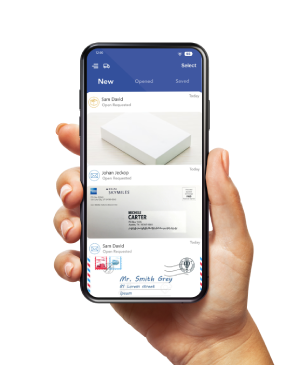
Postal mail is one operation that needs an owner after staff leaves an office. A virtual business address can provide a receiving address and online mail management without leasing that location as your team’s workplace.
PostScan Mail lets you view images of incoming items and request scans of the contents, forwarding, pickup, or disposal. Budget for the actions you expect to use. The subscription doesn’t cover your entire mail-handling bill. Compare PostScan Mail pricing and fees, including extra items, scans, forwarding, postage, storage, and receiving names.
For a larger operation, discuss workflows with the digital mailroom team. Assign responsibility for reviewing scans, deadlines, and physical originals. A mailing address does not replace working space, a registered agent appointment, or an address that an institution specifically requires to reflect operations.
Choose remote work when it supports it, and the budget shows a benefit. If mail is part of your transition, compare PostScan Mail locations and confirm the selected facility’s services before changing your receiving address.
Access & Manage Your Postal Mail
Anywhere Anytime!
Receive mail anywhere, on any device.
We offer 1000+ mailing addresses for both personal and business use.