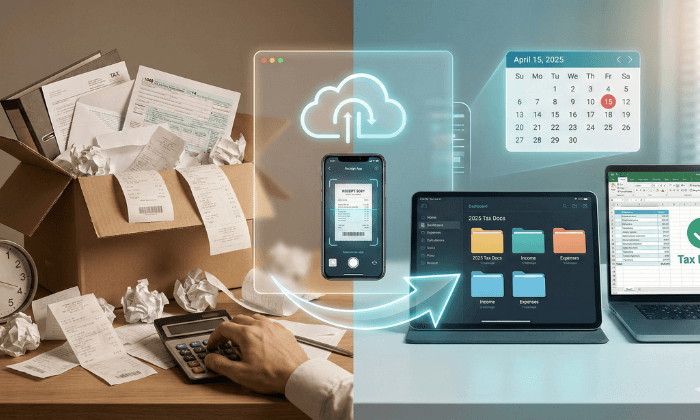
Tax Season 2025 is approaching. Does that sentence make your stomach drop?
For most small business owners and freelancers, the anxiety isn’t about paying the taxes—it’s about the hunt. It’s the frantic search through desk drawers for that one deductible invoice, the faded thermal receipts crumpled in your car cupholder, and the stack of unopened envelopes sitting on your counter.
This “Shoebox Method” of record-keeping isn’t just stressful; it’s expensive. Missed receipts mean missed deductions, effectively donating your hard-earned revenue to the IRS.
In 2025, there is a better way. By combining a Virtual Mailbox with smart digital workflows, you can stop paper clutter at the source and make tax prep as simple as clicking “Download.”
The Mailbox Bottleneck: Why You Can’t Find Your Documents
Most advice tells you to “scan your receipts.” But that ignores the biggest source of business documentation: The Postal Mail.
Bank statements, 1099-NEC forms from clients, invoices, and IRS Notices all arrive in the mail. If you travel, work remotely, or just hate opening mail, this is where the bottleneck happens.
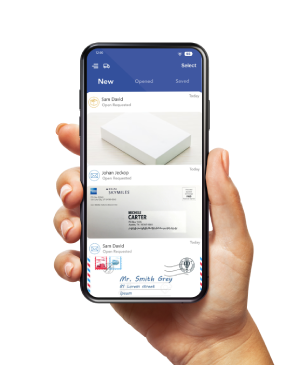
A Virtual Mailbox solves this by moving the mailbox to the cloud. Instead of piling up on your desk, your mail is scanned upon arrival. You see the envelope image on your phone, and with one tap, you can request to Open & Scan the contents.
"Disorganization is a tax on your time. Every hour spent hunting for a receipt is an hour not billed to a client. The 'Shoebox Method' is the most expensive filing system in existence."
Pro Tip: This creates an immediate, digital Audit Trail with timestamps, ensuring you never “lose” a document again.
Step 1: Stop the Paper at the Source (The Virtual Advantage)
The first rule of organization is to stop the bleeding. You cannot organize a mess that keeps growing.
By switching your business address to a PostScan Mail location, you effectively put a “gatekeeper” in front of your tax documents.
Step 2: The Touch It Once Sorting System
Once your mail is digital, you need a system. The goal is to touch each document only once. Do not open it, look at it, and close it. Action it immediately.
"The golden rule of paper management is 'Touch It Once.' If you open a piece of mail and put it down without digitizing or actioning it, you have just doubled your workload."
Get Your Custom Action Plan. Generate a personalized tax prep checklist in 3 clicks.
The 3-Folder Method (Digital)
Create these folders in your PostScan Mail dashboard or Cloud Storage (Google Drive/Dropbox):
Why this matters: When your accountant asks for “all 1099s,” you don’t have to search. You just share the “Income 2024” folder link.
Step 3: Digitizing the Pocket Receipts
What about the coffee you bought for a client meeting? Or the printer ink from the store? These don’t come through the mail.
For these, you require a mobile bridge.
"The IRS does not require the original paper receipt if the electronic copy is identical. Digital records are not just acceptable; they are preferred for their durability and searchability."
Can you write off that coffee? Test your tax knowledge in 60 seconds.
Step 4: Integrating with Your Accountant
The ultimate goal is a smooth hand-off to your CPA.
PostScan Mail integrates with tools like Google Drive, Dropbox, and Microsoft OneDrive. You can set up automation rules:
- IF mail is scanned -> THEN save a copy to “Dropbox/Tax_Docs_2025”.
This means by the time April 15th rolls around, your accountant already has 90% of your documentation without you lifting a finger.
Get Tax-Ready Before the Rush
The best time to plant a tree was 20 years ago. The best time to organize your taxes is now, before the January mail rush begins.
Switch to a Virtual Mailbox today and start 2025 with a clean desk and a clear mind.
Existing user? Check your inbox status
Disclaimer: PostScan Mail provides logistics solutions, not tax advice. Always consult with a certified CPA for your specific tax filings.
Access & Manage Your Postal Mail
Anywhere Anytime!
Receive mail anywhere, on any device.
We offer 1000+ mailing addresses for both personal and business use.
You Might Also Like

Limited Liability Company's Registered Agent: The Complete Guide
Ensure your LLC stays compliant this tax season. Learn why a reliable Registered Agent is your first line of defense against legal notices.

How to Run a Business Without a Permanent Address