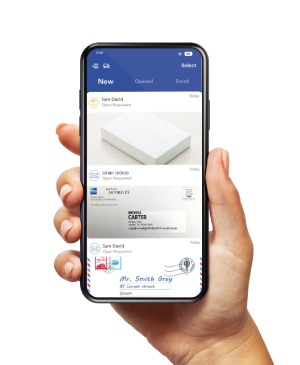
A few envelopes can still create several unfinished jobs: an invoice to pay, a statement to reconcile, and a document someone needs on paper.
To manage business mail each day, review new envelopes, request scans of content when needed, assign each document an owner and deadline, and decide what happens to the original. Track business tasks and paper-handling requests separately.
This routine works for a solo founder or a small team. You can use it with mail collected at your business or with a virtual mailbox that lets you review postal mail online.
Choose a routine for your mail volume
Start by counting what arrives and what you actually need to read. An envelope image, an opened document, and a forwarded original each represent a different handling step.
For a low-volume business mail workflow, set one review time each workday. Then check outstanding requests and documents with deadlines.
Adjust that schedule if your business receives time-sensitive correspondence.
- Review new arrivals and identify items that need opening.
- Check whether earlier scan or forwarding requests have finished.
- Review due dates in your task list.
- Once a week, check unresolved items, physical storage, and plan usage.
If you receive USPS mail through a U.S. PostScan Mail address, complete the required identity verification and USPS Form 1583 authorization before relying on that address for incoming mail. Follow your account’s activation instructions.
Review new items before deciding what to scan
Use the envelope image to identify the addressee, sender, arrival date, and visible delivery markings.
Those details help you choose the next step, but they do not reveal everything inside.
An unfamiliar sender is not enough reason to discard a letter.
If an envelope could contain a tax notice, insurance change, payment request, or legal document, arrange to review its contents and involve the appropriate adviser when needed.
For each arrival, make one initial decision.
- Request contents when you need to read, verify, or act on the document.
- Arrange forwarding when you need the physical item.
- Dispose of confirmed unwanted material using the appropriate option.
- Investigate an unfamiliar addressee or damaged item before requesting further handling.
This first pass is a sorting decision. It does not prove a bill has been paid or that a deadline has been met.
Decide what to scan
Requesting a content scan when you read the document helps you decide, complete a task, or keep a business record.
Avoid paying to open material you have already confirmed is unwanted.
PostScan Mail’s mail scanning service lets you request that we open mail and scan its contents.
When the scan is available, review it before filing or sharing.
- Can you read the text, dates, amounts, and reference numbers?
- Does the document appear complete, including any referenced attachments?
- Do you need an image of the reverse side, a clearer scan, or the original?
Contact support about missing or unreadable content rather than guessing. Do not assume a reverse side or an attachment was captured unless you can see it.
Use a consistent filename after downloading a document, such as 2026-11-08_VendorName_Invoice-1042.pdf. Keep sensitive identifiers out of filenames, and store records containing personal or financial information in a restricted folder.
Assign and track actions
Give every document that requires work a named owner and a next step. If you run the business alone, put your own name in the owner field so the record still shows who is responsible.
A spreadsheet or your existing task app can hold the arrival date, sender, document reference, next action, owner, due date, document link, paper decision, and completion evidence.
Keep two status fields. A business-task status might read “payment approved” or “reconciled.” A mail-handling status might read “scan requested” or “forwarding requested.” Completing one does not complete the other.
For example, receiving a scanned invoice does not mean the invoice has been paid. Record the payment confirmation separately.
Example of a 12-item business mail week
The following example uses a fictitious business. It illustrates decisions and workload, not customer results or a recommended legal retention schedule.
| Qty | Document | Scan decision | Task owner / next action | Paper decision |
| 6 | Confirmed offers | No content scan | Founder / confirm unwanted | Discard or recycle as appropriate |
| 3 | Vendor invoices | Scan all three | Founder or bookkeeper / verify and pay once | Hold until record and retention checks |
| 2 | Account statements | Scan both | Founder or bookkeeper / reconcile | Apply record-retention policy |
| 1 | Signed agreement | Scan for review | Founder / review required action | Forward original if needed |
The week produces 12 incoming envelopes and six content-scan requests. One document also needs forwarding.
We still need a retention or disposal decision for the other originals after we check the digital records.
If you later want to reduce repeated copying, PostScan Mail’s Zapier integration can connect supported mail events to other apps.
For example, a completed-scan event can save a document to cloud storage or notify a team member. Test the available fields and access settings before using real business documents.
Start with one repeatable step. Keep payment approvals, document interpretation, and disposal decisions under the control of the person responsible for them. Zapier requires an account, and its fees may apply.
Keep, forward, or dispose of originals
Make a paper decision after reviewing the document.
A readable scan does not automatically mean you can destroy the original.
- Keep the original when an issuer, contract, adviser, or applicable requirement calls for it.
- Forward it when you need the physical document at another address.
- Shred it when retention requirements are satisfied, and it contains information that needs secure disposal.
- Use an appropriate discard or recycling option for material that does not require shredding.
The IRS explains that record-retention periods depend on what a document records and the circumstances involved.
Use its recordkeeping guidance when setting a policy for tax-related documents; do not apply one disposal date to every letter.
The FTC’s business data-security guide also recommends protecting sensitive information and disposing of it securely when it is no longer needed.
Apply the same care to downloaded scans and shared copies.
PostScan Mail’s published pricing lists 14 free days for letter storage on monthly plans and 30 on annual plans.
After that, the listed charge is $0.05 per envelope per day. Check the terms for your selected address and set a reminder before its free-storage window ends.
When you request mail forwarding, confirm the destination and shipping choice, review the handling and postage charges, and track the shipment.
Record receipt before closing the paper-handling task. Forwarding does not itself complete the business action inside the envelope.
Estimate your costs from the work your mail creates
Compare incoming-item allowances and content-scan allowances separately.
A plan that covers your envelope count may still generate scan charges.
For this example, repeat the 12-item week four times: 48 incoming envelopes and 24 content scans.
This is a four-week comparison, not a forecast for every calendar month. Assume each scanned envelope contains no more than 10 pages.
On November 8, 2026, the Minneapolis address at 2112 Broadway St NE, Suite 225, listed monthly Starter at $10 with 30 incoming items, and Standard at $20 with 60 incoming items and five included content scans.
The calculations below use those monthly plans, not annual billing.
| Monthly plan | Included allowances | Example calculation | Subtotal |
| Starter — $10 | 30 incoming items; no included content scans | $10 + (18 × $0.50) + (24 × $2) | $67 |
| Standard — $20 | 60 incoming items; 5 content scans | $20 + (19 × $2) | $58 |
These subtotals use the published $0.50 charge for an extra incoming item and $2 for an additional content scan of up to 10 pages. They exclude forwarding, postage, storage overages, shredding, extra recipients, applicable taxes, and other charges.
Standard costs less for this illustrative workload because its allowances cover more of the actual handling. That result can change if fewer documents need scanning.
Use the current plans and pricing to check scan-page overages, forwarding handling and shipping, storage, disposal, and additional recipient or user fees.
Then confirm the total for your chosen address. Prices and available services can vary.
Give every letter a next step
A small mail volume is manageable when each item has a clear outcome. Review the arrival, read what matters, assign the work, decide what happens to the paper, and confirm completion.
Start with next week’s mail. Record the envelopes received, requested content scans, originals kept or forwarded, and open tasks. Use those counts to choose a plan that fits your routine.
Create Your Virtual Mailbox with PostScan Mail by choosing an available mailing address and reviewing its plan and handling options.
Access & Manage Your Postal Mail
Anywhere Anytime!
Receive mail anywhere, on any device.
We offer 1000+ mailing addresses for both personal and business use.