For large companies, physical mail isn’t going away anytime soon.
The tricky part isn’t getting the mail it’s opening, sorting, and routing thousands of paper documents without burning through hundreds of staff hours.
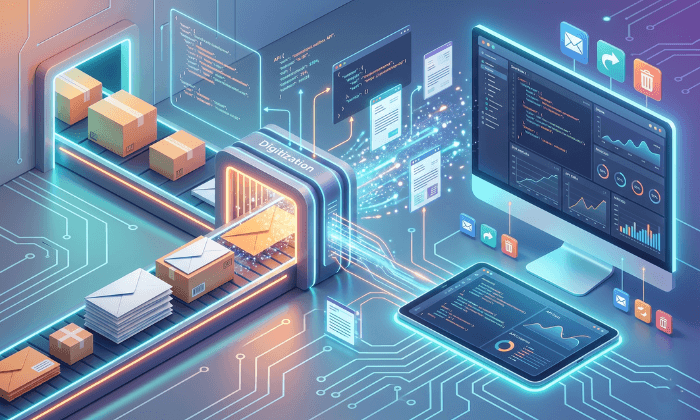
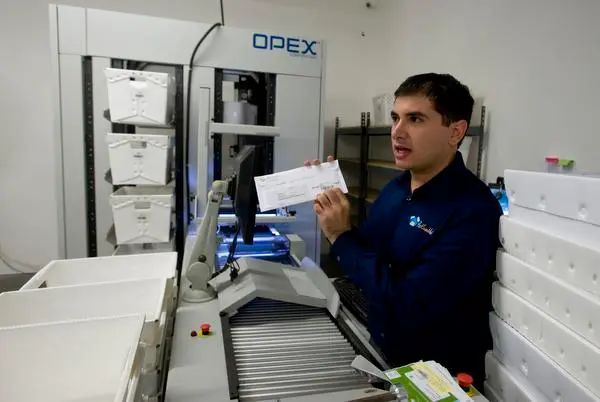
That is where an OPEX mailroom comes in. By pairing heavy-duty physical machinery with cloud management software, operations can slice open envelopes, pull out documents, scan them, and route the data straight to the right person in seconds.
Why Automate Your Mail Processing?
- One-Touch Processing: Equipment like the OPEX AS7200 lets an operator open, pull, and scan mail all in a single pass.
- No More Bottlenecks: Hardware takes care of the physical paper stack, while software handles security and remote delivery.
- Built for Volume: Designed to process thousands of envelopes every hour with a fraction of the manual labor.
What Is an OPEX Mailroom?
An OPEX mailroom relies on specialized, high-capacity equipment manufactured by OPEX Corporation.
These aren’t the standard office scanners you see sitting in a corner copy room. They are industrial workstations built to tear through massive stacks of mail without the slow, multi-step prep work.
How the OPEX AS7200 Works
In a traditional setup, someone opens an envelope by hand, removes the letter, flattens it out, removes staples, and feeds it into a scanner.
The AS7200 cuts all of those extra steps down to a single movement:
- Envelope Opening: Precision cutting blades trim the edge of the envelope without slicing the contents inside.
- Content Extraction: Suction arms or mechanical grips open the envelope wide so the operator can grab the contents effortlessly.
- High-Speed Scanning: The machine scans both sides of the document at high resolution—including the original envelope—so you have a complete paper trail.
How Mail Automation Works in 4 Steps
Turning a mountain of paper mail into clear digital files happens in four straightforward steps:
1. Loading and Opening
Unopened mail goes directly into the machine’s feeder. The hardware automatically adjusts for thick, thin, small, or large envelopes so the system doesn’t jam.
2. Scanning and Reading Text
As the paper passes through the scanner, smart software reads the printed text on the page. It automatically picks out key details like names, account numbers, and document types (such as invoices or legal forms).
3. Organizing the Files
While the machine scans the paper, cloud software (like PostScan Mail) organizes the digital files and tags them with the right information. You can even connect the software to your accounting or customer management systems so data flows right where you need it.
4. Instant Delivery
Once the paper is scanned, a digital copy drops straight into the right person’s account—no matter where they happen to be working that day.
How It Works in Real Life
At PostScan Mail’s processing center in Anaheim, California, OPEX automated hardware is hooked directly into the cloud platform.
The physical machines handle thousands of pieces of incoming paper daily, while the software manages index tags, user permissions, and secure shredding schedules to keep sensitive records protected.
Manual Mailroom vs. Automated Mailroom
|
Feature |
Manual Mailroom |
OPEX Digital Mailroom |
|
Speed |
100–200 items/hour per person |
2,000+ items/hour per station |
|
Labor Needs |
High (requires team of handlers) |
Low (one operator per station) |
|
Searchability |
Poor (digging through file cabinets) |
Instant (searchable text and OCR tags) |
|
Security Risk |
High (lost paper, physical theft risks) |
Low (encrypted digital files and audit trails) |
|
Remote Access |
None |
Total (access anywhere via web or app) |
Industrial hardware gives you the raw speed needed to open and scan heavy paper mail, while cloud software gives those scans a clear path to the right recipient.
By putting a full OPEX digital mailroom setup into place, your business stops getting bogged down by daily stacks of paper and can finally handle incoming mail like any other digital message.
More Enterprise Automation Resources
What is a Digital Mailroom & Why PostScan Mail is the Answer
Learn the core concepts of digital mailrooms and how our software layer transforms high-volume physical mail into secure, remote-accessible digital assets.
Mail Scanning & Digitization: How it Works