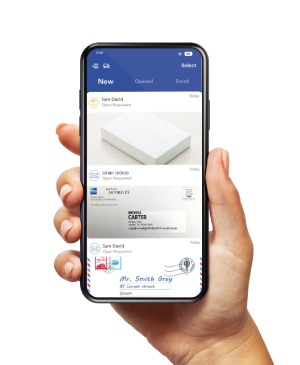
Virtual mailbox security depends on how a provider handles your physical mail, protects scanned documents, and controls access to your account.
A service can help you manage mail while you travel or work remotely, but its security also depends on your location and how you use your account.
Before sending sensitive correspondence to a new address, ask three questions. Who handles the originals? Who can view the scans? What happens to both when you no longer need them?
PostScan Mail publishes information about its encryption, account controls, and privacy practices.
This guide explains those practices and the checks you can make before choosing a service. Information checked October 21, 2026.
What virtual mailbox security needs to cover
A virtual mailbox receives physical mail and lets you manage it through an online account. Scanning creates a digital copy; it does not remove the need to protect the original.
| Part of the service | What needs protection | What to check |
|---|---|---|
| Mail receipt and storage | Envelopes, documents, and packages | Staff access, storage arrangements, and item tracking |
| Opening and scanning | Contents and recipient assignment | Authorization, handling procedures, and correction of errors |
| Online access | Scans and account settings | Encryption, authentication, and user permissions |
| Forwarding or pickup | Originals moving to another person or place | Destination checks, tracking, and release procedures |
| Disposal and closure | Paper, scans, and retained account records | Shredding availability, deletion rules, and retention limits |
Security and privacy answer related questions. Security concerns protection against unauthorized access or loss. Privacy concerns how a service collects, uses, shares, and retains information. Review both before routing personal or business mail to a provider.
Check how the selected location handles physical mail
Confirm the location’s procedures for receiving, assigning, storing, and releasing items. Ask how staff match mail to your account and what happens if an envelope has an incomplete name or mailbox number.
PostScan Mail’s terms describe a network that includes independently operated locations. Those operators manage their day-to-day operations. Confirm local arrangements instead of assuming every address has identical equipment, staffing, or storage space.
Useful questions include whether the mail-processing area is access-controlled, how they verify pickup identity, and how the location records forwarding or disposal requests. Ask how it handles a suspected mix-up and whom you can contact about a specific item.
For important originals, decide in advance whether you will keep them in storage, arrange pickup, or request forwarding. Check handling limits and charges, and confirm security arrangements.
Understand identity verification and scanning authorization
For a U.S. commercial mail receiving agency, USPS Form 1583 authorizes the agent to receive mail. The official USPS form and instructions require identification, including a photo ID and address verification. PostScan Mail’s Form 1583 setup guide explains how to activate it.
Postal authorization and content-scanning instructions serve different purposes. PostScan Mail’s terms authorize exterior scanning and requested handling actions, including opening, scanning, forwarding, and disposal. Review the terms and any standing instructions before assuming an envelope will remain unopened.
Staff who open and scan a document necessarily handle its contents. A useful security question is how the provider authorizes and limits that access. Don’t treat a scanned-mail service as a system where no provider personnel can access your information.
For the service sequence, see how PostScan Mail works.
Understand what encryption and hosting protect
PostScan Mail’s security and privacy page states that it uses AWS for application hosting and storage, HTTPS for communications, and AES-256 encryption for data at rest. It also describes two-factor authentication and controls for reviewing and ending active sessions.
Encryption in transit protects data while it moves over a connection. Encryption at rest protects stored data. Neither description, on its own, establishes who can view a document through an authorized account or service process.
Cloud hosting also has a defined scope. AWS describes security as a shared responsibility between AWS and its customer. The infrastructure provider’s protections do not replace the mailbox provider’s work on application security, permissions, and operating procedures.
When assessing an audit or compliance claim, ask which company, system, locations, and reporting period it covers. A hosting provider’s assurance does not establish that every part of a mail-handling service has undergone the same review.
Set up your account before routing sensitive mail
Use the available account controls and protect the email address used for notifications or account recovery.
The FTC recommends two-factor authentication to protect online accounts, including email accounts.
- Create a password you don’t use on another service. Store it in a password manager rather than sharing it with a team.
- Enable two-factor authentication. Follow the account setup and recovery instructions, and keep recovery information out of shared folders.
- Review active sessions. End sessions on devices you no longer use or recognize.
- Check recipient names and forwarding destinations. Update them when staff, addresses, or responsibilities change.
- Protect downloaded scans. Use a device and storage account you control, restrict sharing, and remove copies you no longer need under your retention policy.
An email attachment or exported PDF is another copy of the document. Once you move it outside the mailbox platform, review the access controls at its new destination.
Give team members access through the correct account setup
PostScan Mail distinguishes recipients from users. Its features page explains that the primary account holder can view all users’ assigned mail, while individual users can access their own assigned items. An additional recipient name should not be treated as a separate private login.
Review PostScan Mail’s recipient and user management features before setting up access for an assistant, employee, or family member. Confirm the arrangement that matches your needs rather than distributing the primary account password.
Treat paper disposal and digital deletion as separate actions
Request the action that matches the copy you want removed. Shredding an envelope’s contents does not, by itself, delete a scan, a downloaded PDF, or account records.
| Copy or record | Action to consider | What to confirm |
|---|---|---|
| Physical document | Retain, forward, or request shredding | Availability, authorization, and completion status |
| Scan in your mailbox | Delete when your retention requirements permit | What the delete action covers |
| Download or emailed attachment | Remove or restrict it in the destination system | Other users, shared links, and additional copies |
| Account records and backups | Review the retention and deletion process | Required retention and any backup handling |
PostScan Mail’s support guidance distinguishes recycling for non-sensitive mail from shredding for confidential documents. It also states that facilities with that capability offer secure shredding. Confirm it for your chosen address before relying on the service.
Recycling suits material that doesn’t require confidential destruction. For documents containing personal, financial, or business information, ask about shredding rather than assuming ordinary recycling makes the contents unreadable.
Before destroying an original, check whether you need to keep it for tax, contractual, legal, or other recordkeeping purposes. A convenient scan doesn’t satisfy every original-document requirement.
Read the privacy policy beyond the security headline
PostScan Mail’s Privacy Notice explains how it collects information, shares it with service providers, makes legal disclosures, and retains it. It states that the company does not sell personal information.
Read the retention and deletion provisions as well. The policy allows retention for service delivery, legal obligations, disputes, and fraud prevention. Removing a document from your view or closing an account does not necessarily erase every related record immediately.
For business use, identify any extra requirements that follow from the information you receive. A consumer mailbox subscription, a healthcare workflow, and a company’s personnel records may require different permissions, agreements, and retention rules.
A mail privacy example for a small business
Consider a hypothetical business owner whose assistant handles invoices while the owner handles payroll correspondence. Giving the assistant the primary login can expose mail beyond the intended task.
The owner should confirm the user setup, assign mail to the intended user, and check who can view or export it. If an invoice is then downloaded into an accounting folder, the folder’s sharing settings become part of the workflow. Deleting the mailbox scan later will not remove that separate copy.
What to do if you suspect unauthorized access
Act through a known account or support channel. Do not use a phone number or login link from an unexpected message claiming to report a security problem.
- Change the affected password from a trusted device. Secure the associated email account too.
- Review and end unrecognized sessions, and enable two-factor authentication if it is not already active.
- Check for changed users, recipients, forwarding destinations, and pending requests. Record relevant item IDs and times.
- Contact PostScan Mail support through its official website. Ask it to review the activity and identify whether any requests or shipments need intervention.
If you’ve already handed an item to a carrier, account changes alone will not retrieve it. Ask the provider and carrier what options remain. Keep records of the incident and any confirmed actions.
Choose a service by its controls and your workflow
Choose a mailbox location and account setup that fit the documents you expect to receive. Confirm physical handling, user access, retention, and disposal before sending sensitive mail.
Review the PostScan Mail virtual mailbox service and its published security information. Then confirm the selected location’s handling options and activate the account controls you need.
Access & Manage Your Postal Mail
Anywhere Anytime!
Receive mail anywhere, on any device.
We offer 1000+ mailing addresses for both personal and business use.