To prevent mail theft, reduce the time letters and packages sit unattended. Collect deliveries promptly, use pickup or hold options when you are away, and choose a receiving address you can manage.
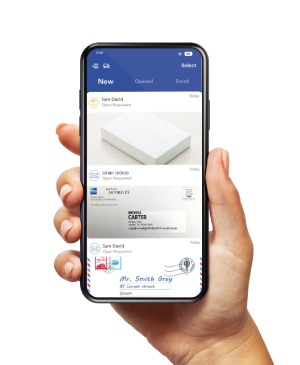
A virtual mailbox can reduce exposure at home by receiving eligible items elsewhere and giving you online access to mail images and requests for handling.
That change addresses a specific problem. It keeps items sent to the mailbox location off your porch
Carrier loss, handling errors, account misuse, and theft after forwarding still require attention.
This guide helps you choose a delivery setup, check a provider’s procedures, and respond when something goes missing.
Start with the delivery problem you need to solve
Mail theft involves taking or possessing mail without the sender’s or recipient’s permission.
Package loss can also result from delays, misrouting, addressing errors, or handling mistakes. A missing item alone does not establish theft.
The USPS mail-theft guidance recommends prompt collection, eligible delivery controls, and contacting the sender when valuable mail is overdue.
Choose a response that fits where the problem occurs.
| Your main problem | Option to consider | What to check |
|---|---|---|
| Letters remain in a home mailbox all day | Prompt collection, a locking mailbox, or another receiving address | Who can collect the mail and whether the mailbox fits USPS requirements |
| Packages sit outside your apartment | A parcel locker, retailer pickup, or a staffed package-receiving service | Carrier eligibility, collection hours, and parcel size limits |
| Mail accumulates during a trip | USPS Hold Mail | Address eligibility and a hold of 3 to 30 days |
| You need to review postal mail while traveling | A virtual mailbox | Scanning options, storage charges, and access to originals |
| A shipment stops progressing before delivery | Carrier support and the sender’s shipment records | Tracking status, the service used, and the applicable search or claim process |
USPS Hold Mail has no service fee. It covers eligible USPS mail for the address during the hold. Arrange separately for deliveries handled by another carrier during the journey.
Reduce exposure at your current address
You can make several changes before paying for another mailbox.
- Arrange collection after delivery. If you cannot be home, agree on a pickup plan with a household member or someone you trust.
- Turn on carrier notifications. Use alerts to plan collection. A delivered scan does not mean you have taken possession of the item.
- Choose pickup when available. Check the shipment’s options for locker, retailer counter, or Post Office pickup instead of an unattended doorstep.
- Plan for absences. Request an eligible mail hold before a trip, and change pending parcel deliveries where the carrier permits.
- Protect outgoing mail. Take checks and documents to a Post Office rather than leaving them in an exposed home mailbox overnight.
A camera can record activity, but it does not hold a package behind a lock.
A locking mailbox protects only the items that fit inside it and that the carrier can deliver through its approved opening.
Decide how to receive overflow packages as well.
For an important shipment, discuss signature requirements with the sender.
Confirm who may sign, and avoid authorizing an unattended release when you need an in-person handoff.
How a virtual mailbox reduces mail theft exposure
A virtual mailbox combines a mailing address with an online account. The provider receives your mail, uploads images, and lets you request available handling actions.
The receiving facility keeps physical items until the next pickup.
With PostScan Mail, you can request a virtual mailbox, view images of incoming mail, and request scanning, forwarding, storage, shredding, or recycling.
Local pickup and package handling depend on the selected location and service.
The security benefit comes from changing the delivery destination. A letter sent to your mailbox address does not wait in your residential mailbox while you work or travel.
If you only need the contents, a scan lets you act without arranging another physical delivery.
Check each stage of the mail journey
A receiving address solves only part of the journey. Use this checklist to identify where responsibility and evidence change.
| Stage | Record to keep | Question to resolve |
|---|---|---|
| Sender to receiving facility | Order confirmation, tracking number, and address used | Did the sender include your name and assigned mailbox number? |
| Facility receipt and check-in | Carrier delivery event and the mailbox item record | Has the facility matched the delivery to your account? |
| Storage or scanning | Item image and requested action | Who can access the item, and how long should the original remain? |
| Pickup or forwarding | Pickup confirmation or the onward shipment record | Who may collect it, or where will the next carrier deliver it? |
For example, suppose a carrier marks a package as delivered to your mailbox facility, but it hasn’t appeared in your account. Save the tracking details and ask the facility to check whether they received and processed it. A delivery scan and an account check-in record describe different events.
If you later forward that package, follow the new shipment record. Sending it to an unattended porch can recreate the exposure you wanted to reduce. Arrange pickup, a staffed destination, or another eligible handoff option for that delivery.
This example explains a workflow. It does not establish a processing deadline or prove that any missing item was stolen.
Check the receiving location before you subscribe
Ask how the selected facility handles deliveries. A provider’s website describes the service, but the address you choose determines who handles deliveries, the hours, and the pickup arrangements.
- Ask whether carriers hand packages to staff and what happens outside receiving hours.
- Confirm accepted carriers, dimensions, weight limits, and excluded items.
- Ask how staff match items to accounts and investigate a delivery without a matching item record.
- Confirm who can enter storage areas and how pickup authorization works.
- Review storage allowances, daily charges, pickup fees, and forwarding costs.
- Ask how to report a handling problem and what records the facility can provide.
Review the service terms for exclusions and responsibility during storage and forwarding. PostScan Mail uses both its own facilities and operators that manage their locations independently. Confirm the arrangements at your address before sending an item that would be difficult to replace.
If you mainly need parcel collection, compare package receiving with a plan designed for recurring letter mail and content scanning. You may not need the same features for both.
Protect your mailbox account and scanned documents
Online access adds another place where you need to control access.
Someone with your login credentials could view documents or request handling actions.
PostScan Mail’s security information describes two-factor authentication, session controls, and encryption during transmission and storage.
Those account and data controls don’t explain how staff secures every receiving location.
Use a password you do not reuse elsewhere. Enable two-factor authentication and protect the email account you use for recovery.
Review active sessions and end access from devices you no longer use.
Before requesting a scan, consider where you will save the downloaded file and who can access it.
Before requesting shredding, check whether you need the original for a later transaction. Deleting a file and disposing of a physical document are separate actions.
What to do when mail or a package goes missing
Check the delivery evidence and contact the party that handled the relevant stage.
Report suspected theft without waiting for a carrier delay process to finish.
If tracking says delivered but you cannot find the item
Check the address, delivery location, parcel locker, household members, and building staff. Save any delivery photograph and tracking events. For virtual mailbox deliveries, give the receiving location the tracking number and ask them to check their receipt records.
Under USPS tracking-status guidance, you can submit a service request for an eligible item if it remains missing more than one postal business day after the delivered scan. This service-request timing does not require you to delay reporting evidence of theft.
If you suspect someone stole the item
- Preserve the evidence. Keep tracking details, receipts, delivery photos, messages, and any camera footage. Record when and where the item disappeared.
- Notify the sender or retailer. Ask about its investigation and replacement process. If a check or payment card is missing, contact the bank or issuer promptly and follow its instructions.
- Report suspected USPS mail theft through the U.S. Postal Inspection Service reporting page. If a private carrier handled the package without USPS involvement, contact that carrier and local police as appropriate.
- Keep the incident and service-request numbers. Provide them when following up with the sender, carrier, facility, or insurer.
If tracking still shows the shipment in transit, start with the sender and carrier’s missing-item process. A theft report, delivery inquiry, and insurance claim serve different purposes. One does not automatically start the others or guarantee repayment.
Choose a receiving setup you can maintain
Choose the option that changes the part of delivery you cannot control. A short trip may call for a hold. An occasional parcel may fit a locker or retailer pickup.
Recurring mail that you need to review remotely may justify a virtual mailbox.
If PostScan Mail fits your needs, compare mailbox locations and confirm the facility’s receiving hours, storage rules, and pickup procedures.
Plan the next handoff before requesting forwarding. The goal is to know where your items are and how you will receive them.
Access & Manage Your Postal Mail
Anywhere Anytime!
Receive mail anywhere, on any device.
We offer 1000+ mailing addresses for both personal and business use.