Back in 1988, Bill Gates famously noted that the vision of a paperless office was still far off because computers hadn’t yet simplified administrative work. Years later, Microsoft helped lead the charge by offering paperless proxy voting to its employee shareholders.
Today, excessive paper consumption is recognized as a symptom of inefficient, time-consuming business processes. Replacing physical files with digital tools creates faster, more accurate, and more secure operations. Here are the top 10 software tools to help your business go completely paperless.
Digital Solutions for Everyday Office Tasks
1. Cloud Storage
Replacing physical filing cabinets requires a reliable, central storage hub. Google Workspace (Google Drive, Docs, Sheets) keeps all business documents organized in the cloud. Teams can co-edit documents in real-time from any location, eliminating the need to print draft reviews, markup copies, or paper meeting agendas.
2. PDF Editing
Physical signatures and printed contracts cause major administrative delays. Adobe Acrobat Pro allows businesses to create, edit, convert, and secure PDF files digitally. With built-in e-signature tools, clients and vendors can legally sign agreements from any phone or computer without printing a single page.
3. Virtual Mailbox
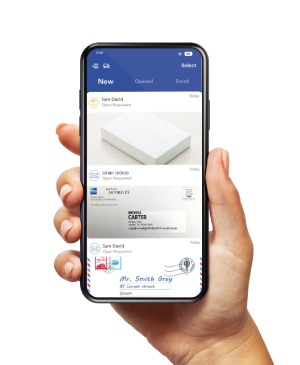
Managing incoming physical mail is one of the biggest hurdles to maintaining a digital workspace. A virtual mailbox service like PostScan Mail receives your paper mail at a secure location, scans the exterior of envelopes, and uploads digital previews to an online portal. You can choose to have contents opened and scanned to PDF, forwarded, recycled, or securely shredded—keeping your physical desk completely clutter-free.
4. Mobile Document Scanning
Physical paper still enters every office—the key is digitizing it immediately. CamScanner turns any mobile phone into a portable scanner. Using Optical Character Recognition (OCR), it automatically extracts text from physical receipts, paper contracts, or whiteboard notes, saving them as searchable digital files.
5. Digital Note-Taking
Paper sticky notes and spiral notebooks are easy to lose and impossible to search. Evernote provides a centralized digital notebook that syncs across desktop and mobile devices. You can record voice memos, save web clips, sketch ideas, and use optical search to find text inside images and handwritten notes.
6. Task Management
Managing projects using paper logbooks or physical office whiteboards creates visibility issues for hybrid and remote teams. Asana digitizes workflow management into interactive Kanban boards and Gantt charts, giving managers real-time project updates without requiring printed status reports.
7. Team Communication
Internal announcements and updates often waste paper through printed notices and memos. Slack consolidates internal discussions into dedicated channels by topic, department, or project. Teams can share files, drop feedback, and integrate third-party tools to streamline daily communication.
8. Time Tracking
Paper timesheets and manual attendance logs lead to accounting errors and lost time. Modern time-tracking software like Toggl Track allows employees to log billable hours with a single click. It automatically compiles accurate timesheets and syncs with payroll systems to keep human resources paperless.
9. Digital Payments
Handling paper checks, cash registers, and paper receipts slows down financial tracking. Square allows businesses to accept credit card payments on mobile devices, send digital invoices, and email or text electronic receipts directly to customers, syncing sales data automatically with your accounting software.
10. Digital Business Cards
Paper business cards are quickly misplaced or thrown away, resulting in wasted printing costs. HiHello allows professionals to build customizable digital business cards that can be shared instantly via QR code, text, or email. Recipients can save your contact details directly to their address book without manual typing.
Putting Your Paperless Office Plan Into Action
Transitioning to a paperless office is no longer about eliminating paper for its own sake—it is about removing friction from your business. By replacing physical filing cabinets, paper forms, manual timesheets, and snail mail with an integrated digital stack, your organization gains instant data accessibility, stronger security controls, and effortless collaboration for remote and hybrid teams.
Access & Manage Your Postal Mail
Anywhere Anytime!
Receive mail anywhere, on any device.
We offer 1000+ mailing addresses for both personal and business use.