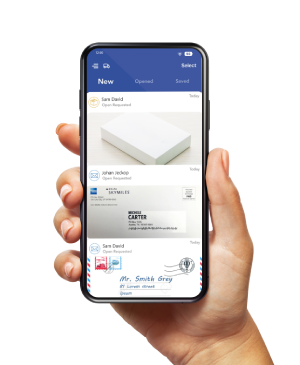
A virtual mailbox lets students receive U.S. postal mail at a staffed location and manage it online while studying overseas.
You can review envelope images, request scans of the contents, and arrange forwarding when you need the original.
It is useful when your dorm or apartment changes but you still need access to correspondence.
Start with the mail you actually expect. If almost everything is electronic and someone you trust can handle the occasional letter, you may not need a paid service.
If you expect private documents or regular deliveries and want to manage them yourself, a virtual mailbox offers a more structured workflow.
How a student virtual mailbox works
A provider receives items addressed to you, records them in your account, and shows you images of the envelope or package label.
Reading an envelope image differs from requesting an open-and-scan action: the latter requires staff to open the item and digitize its contents.
After check-in, you choose which eligible items to scan, retain, forward, shred, or recycle. Pickup may also be available.
Physical handling depends on facility hours and processing; online account access does not mean a document is scanned immediately.
PostScan Mail’s virtual mailbox service offers these mail-management functions.
Who benefits most?
U.S. students leaving for a semester overseas may want one place for domestic correspondence while moving between a host family, dorm, and travel accommodation.
The mailbox can remain their correspondence destination while the account and selected location remain active.
International students in the United States face a different task.
A mailbox may help with routine correspondence during dorm moves or breaks, but school and immigration records still need the correct physical address information.
Keep those records separate from your mail preferences.
A student returning home after a program should also plan for letters that arrive late. Review which senders still use the campus address and what the campus mailroom does after departure.
What a virtual mailbox cannot do
A virtual mailbox cannot guarantee that every sender will accept its address, that an overseas shipment will arrive by a particular deadline, or that customs charges will not apply.
It does not establish where you live, state residency, immigration residence, or school eligibility. Obtain approval for the specific mailing use before changing a university, bank, agency, or other official record.
Check school and immigration address fields before changing them
A mailing address tells an organization where to send correspondence. A physical or residential address tells it where you live.
Permanent address may have a school-specific meaning, so read the field instructions instead of assuming it means a U.S. mailbox.
DHS’s SEVP Portal student guide describes the physical address as where the student lives and allows a separate mailing address.
For F-1 students using the portal during eligible post-completion OPT, follow its instructions and your designated school official’s guidance.
For a concrete institutional example, the University of Washington’s International Student Services requires students’ local address to be residential, not a PO Box, business, or university office.
Its page explains a 10-day reporting period and different update routes for current students and OPT alumni. That is UW’s published process, not a universal campus procedure.
Ask your own registrar or international student office:
- Which field controls routine correspondence?
- Which field must show my current residence?
- How do I update each field when I move or leave the country?
- Will you send this particular transcript, card, or notice to a CMRA?
- Does the recipient need an original or a document sent directly by the institution?
If you have a pending immigration application, follow the relevant agency’s current change-of-address instructions separately. Updating a mailbox account is not an immigration address report.
Choose a mail destination for your study period
| Option | Works well when | Main check |
| Virtual mailbox | You want to control scans and forwarding remotely | Full cost, processing time, sender acceptance, and destination support |
| Family or trusted friend | Mail volume is low, and you are comfortable sharing access | Who will open, store, and ship private items |
| Campus mailroom | You remain eligible for campus delivery | Break hours, departure policy, forwarding, and storage |
| PO Box | You need a U.S. holding point and can arrange collection | Access while overseas and available forwarding options |
Think about who will act on a letter after it arrives. A storage location alone is not a plan for a bill or notice with a response date.
Set up your mailbox before departure
1. Inventory your senders and documents
List the organizations that still send paper mail, the address each currently uses, and whether you need a scan or an original.
Include scholarship correspondence, employer paperwork, insurance letters, and personal deliveries only if relevant to you.
Ask the issuer before redirecting sensitive originals. A scanned document may be readable but still fail a recipient’s requirement for an original or institution-to-institution delivery.
Do not route a passport or immigration document through a forwarding chain without confirming the issuer’s and carrier’s rules.
2. Verify the location and total price
Review incoming-item allowances, content scans, additional pages, storage, recipient limits, disposal, and forwarding.
A package can cost more to store or ship than several letters. Review current PostScan Mail pricing and the terms for your selected location.
Do not budget around an assumed student discount, nine-month contract, textbook-return service, or university-branded address. Use only the plan and features actually offered at checkout.
3. Finish identity verification
For USPS mail received through a U.S. Commercial Mail Receiving Agency, USPS rules require Form 1583 and current acceptable identification.
Follow the provider’s instructions for witnessing, notarization, and approval.
PostScan Mail’s Form 1583 guide explains its online and local completion options. It also distinguishes U.S.
USPS mail from international locations and U.S. non-USPS-only deliveries, where different verification requirements apply. Do not assume paying for an account completes activation.
4. Update approved senders and test the address
Use the complete assigned address, including the PMB or designation where required. Notify each sender directly and save confirmations.
Any eligible postal forwarding should support this transition; it should not replace direct updates.
Send a low-risk test letter. Confirm it appears in your account, notifications work, and you can sign in using the devices and authentication method you will use abroad.
5. Set a repeatable review routine
Check the account on a schedule that fits the correspondence you receive.
Use content scans for documents you need to read, keep originals when required, and, where practical, group nonurgent forwarding requests.
Maintain a short action log: item received, response needed, original required, and action completed. This helps separate I saw the envelope from I handled the document.
Budget for the journey, not just the subscription
Your monthly cost may include the base plan, extra items, content scans, pages, storage, handling, and postage.
International shipments may also involve destination taxes or duties. Check the quote and destination rules for the actual contents.
Illustrative example: Maya receives four letters while studying in Spain. She requests scans of two, recycles one advertisement, and asks for one original to be forwarded.
She should compare the scan allowance with her plan, then review handling and postage for that shipment.
Import charges depend on what is shipped and destination rules, not simply the number of envelopes.
If Maya needs the original before an appointment, she should work backward from the deadline, accounting for facility processing, carrier transit, possible customs clearance, and local delivery.
A scan can help her understand a notice earlier; it cannot replace a required original.
What to do when you move during the semester
Update the destination for future forwarding requests before approving a shipment.
Verify the full local address, recipient name, phone details if required by the carrier, and whether a dorm or host will accept delivery.
Check pending requests separately. Changing an account setting may not reroute a shipment already dispatched.
Save the onward tracking number; it is different from the tracking number used to deliver the item to the mailbox.
When your program ends, update senders again. Before canceling, export documents you need, resolve stored items, and ask about post-closure handling.
USPS rules for leaving a CMRA differ from an ordinary residential change of address.
Keep your mail manageable while you study
A useful student mail plan separates three decisions: where correspondence arrives, what you need to read online, and which originals must reach you.
Keep actual residence and school or immigration records accurate through the proper channels.
Compare PostScan Mail plans for your expected volume and forwarding needs.
Confirm address acceptance and complete activation before directing important documents to the service.
Access & Manage Your Postal Mail
Anywhere Anytime!
Receive mail anywhere, on any device.
We offer 1000+ mailing addresses for both personal and business use.