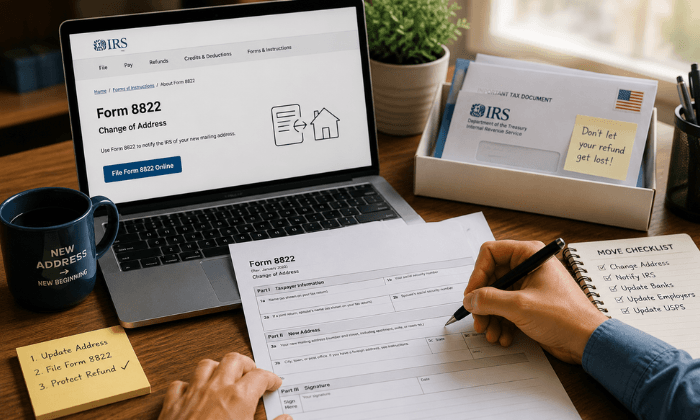
To file IRS Form 8822, download the current form, complete the applicable fields, sign it, and mail it to the IRS destination listed in its instructions.
Choose the mailing destination based on your old home mailing address and the return type.
Do not attach Form 8822 to your tax return.
Form 8822 changes your home mailing address for individual, gift, estate, or generation-skipping transfer tax records.
Business updates generally use Form 8822-B. You can also notify the IRS through other approved methods, so Form 8822 isn’t your only option.
This guide explains how to choose the right route, avoid common filing mistakes, and keep a usable record of your request.
Do you need Form 8822 after moving?
Notify the IRS when your mailing address changes. How you do that depends partly on whether you have already filed your return.
If you move before filing, use your new address on the return
The IRS updates its records when it processes that return. If you move afterward, you can submit a separate address notification.
The IRS also accepts signed written notifications and address changes by phone or in person, subject to identity verification. See IRS Topic 157 on address changes for the available methods.
For example, if you filed in February and moved in June, don’t assume the address on that February return will change automatically. Choose an IRS notification method and record when you used it.
Form 8822 vs. Form 8822-B
These forms update different records. A business owner may need to consider both.
| What changed? | Which form should you check? |
|---|---|
| Your home mailing address for personal tax records | Form 8822 |
| A business mailing address or business location for an entity with an EIN application on file | Form 8822-B |
| The identity of a business responsible party | Form 8822-B |
The IRS Form 8822-B guidance identifies business mailing addresses, business locations, and responsible parties as separate updates.
Report a responsible-party change within 60 days. Do not present that deadline as a universal deadline for every personal address change.
A home-based business move can affect more than one record.
Before filing, list the personal and business records involved, then match each one to the appropriate form. If you are unsure which records your move affects, ask your tax professional.
How to fill out and file IRS Form 8822
Use the official Form 8822 and instructions. The current download checked for this guide carries a February 2021 revision date. An older revision year does not automatically mean the form is obsolete.
Step 1: Choose the affected returns
Check the applicable return boxes. Complete the decedent fields when required for an estate return.
Step 2:Enter names and addresses
Complete your identifying information, applicable spouse and prior-name fields, old address, and new address. Include required unit details. Use the spouse’s separate old-address field if applicable.
Step :3: Check signatures
Sign and date. A spouse generally must also sign after a joint return, except when the separate-residence box applies.
Step 4: Select the filing destination
Follow page two’s routing instructions. The line 2 checkbox changes routing; otherwise, use the old-address category, including applicable special categories.
Step 5: Mail separately and retain a copy
Do not attach it to your return. Keep a copy and dispatch record.
Before sealing the envelope, compare the completed form with the instructions one more time.
In particular, check that you used the old address when selecting the destination, rather than the new state you are moving to.
If you choose a mailing service with tracking, retain its receipt with your copy.
A delivery scan can document arrival at a destination; it does not prove that the IRS has updated your tax account.
Where do you mail Form 8822?
There is no single mailing address for every Form 8822 submission.
Use the current form’s instructions rather than copying an address from a search snippet or an old checklist.
A useful check is to write down why you selected the destination: the applicable return category and, where relevant, the old mailing location. If you cannot explain which instruction led you to the address, pause and recheck the form.
This guide links to the official routing instructions instead of reproducing a nationwide address table that may become outdated.
Do not use an IRS address labeled for comments about forms as your filing destination.
How long does the IRS address change take?
Allow several weeks. The Form 8822 instructions and IRS address-change FAQ say generally four to six weeks.
IRS Topic 157 currently says generally 45 days for full processing. These estimates differ and do not guarantee a completion date.
For planning, allow about six weeks or longer, plus mailing time. This is a practical planning allowance, not a new IRS deadline or service promise.
Keep monitoring correspondence during that interval.
If a notice, refund problem, or other time-sensitive matter is already outstanding, contact the IRS through the relevant official channel rather than waiting for the address update to resolve it.
Keep two dates in your records: when you sent the request and when any tracked shipment arrived. Neither date should be labeled “IRS address updated” without confirmation.
Does changing your address with USPS update the IRS?
USPS change-of-address information may update IRS records through the National Change of Address database. However, the IRS still advises notifying it directly. Not all post offices forward government checks.
Treat forwarding and tax-record updates as separate tasks on your moving list.
Also tell your return preparer about the move so they don’t unintentionally reuse an old address on a later filing.
PostScan Mail’s change-of-address checklist can help you organize the other senders and accounts you need to update. An IRS notification does not complete those separate changes.
Can a virtual mailbox help you manage IRS correspondence?
A virtual mailbox can help you review incoming mail while traveling or working remotely.
PostScan Mail provides exterior mail images and scans of requested content, and forwards eligible originals under the selected location’s terms.
That service does not file Form 8822 for you, confirm an IRS address update, or answer a tax notice.
Review the form’s address instructions and confirm the appropriate mailing arrangement with the IRS or a qualified tax professional before substituting a commercial mailbox.
A correspondence address does not establish where you live or operate a business. Do not use it to represent residence, domicile, or an actual business location when those facts are requested.
If you use a mailbox service, decide who will check for tax correspondence and who will act on it. Request originals when needed, and avoid disposing of documents before you determine your recordkeeping needs.
Finish the address update and keep the records
Choose the correct IRS notification method, follow the current instructions, and retain evidence of what you submitted. Continue checking your mail while the update processes.
If remote access would help you manage future correspondence, review PostScan Mail’s virtual mailbox service. Complete the IRS update separately, verify the address used, and then direct important tax mail to the new receiving location.
Access & Manage Your Postal Mail
Anywhere Anytime!
Receive mail anywhere, on any device.
We offer 1000+ mailing addresses for both personal and business use.