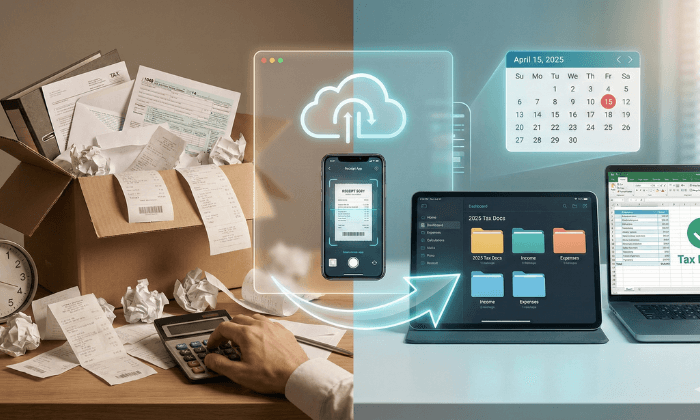
Organize business receipts for taxes by capturing each document, checking its contents, linking it to the transaction in your books, and storing it where you can retrieve it.
Apply the same process to mailed invoices, tax forms, and government notices.
The goal is to connect each accounting entry to evidence of what happened.
A folder of receipt photos helps only if you can find the right document and explain the transaction.
Start with one intake location, one filing convention, and a monthly review. Add a separate process for mail that requires a response before a deadline.
Which Business Records Should You Collect?
Keep documents that support your business income, expenses, assets, and tax reporting.
The IRS allows recordkeeping systems suited to the business, as long as they show the required financial information.
- Purchase records, including itemized receipts, invoices, payment confirmations, and related contracts.
- Income records, including customer invoices, sales reports, deposit details, and information returns such as Forms 1099.
- Asset records, including equipment purchases, improvements, business use, and eventual sale or disposal.
- Payroll and tax records, including employment tax documents, filed returns, notices, and responses.
Several documents may support one transaction.
An invoice describes the purchase; a payment record shows payment; a business-purpose note supplies context.
Keep them connected rather than treating each as a separate expense.
Organize Receipts and Tax Mail in Five Steps
1. Capture records from every source
Photograph paper receipts before the print fades. Save emailed receipts and download invoices from vendor portals.
Capture every page, including item descriptions, tax, tips, discounts, and the final total when applicable.
Assign someone to review postal mail. PostScan Mail’s mail scanning service lets you request scans of eligible contents for download.
Start with the envelope image, request an Open & Scan when you need the document, and save the resulting PDF with its accounting record.
Give tax notices priority over routine filing.
Read the notice, identify the tax period and requested action, and calendar the stated response deadline. Record who will handle it. Saving the PDF does not complete the response.
2. Check the evidence and add context
Before filing an expense record, check the vendor, date, amount, goods or services, and payment evidence.
Add the business purpose when the document does not explain it.
Travel, meals, gifts, and transportation can require additional substantiation.
For a business meal, record the participants, business relationship, and purpose.
Keep relevant trip or mileage records rather than expecting a restaurant or fuel receipt to establish every required fact.
For example, an office-supply receipt may include printer paper and a personal purchase. Preserve the full receipt, identify the business portion, and record the allocation.
Do not crop away details to make the receipt match the amount entered in your books.
3. Use filenames and folders that match your books
Create a folder for each business, then organize records by tax year and document type.
Use the expense categories in your chart of accounts so the filing system and bookkeeping use the same terms.
A small business might use folders for Income, Expenses, Assets, Payroll, Tax Forms, Notices, and Filed Returns.
Within Expenses, add only the categories you use. Store ongoing formation and ownership records separately from annual receipts.
Use the transaction date for purchase filenames. For example, 2026-10-27_SupplyCo_84.50_OfficeSupplies.pdf identifies the date, vendor, total, and category.
Add an invoice number or internal record ID when it helps distinguish similar purchases.
For tax forms, include the tax year shown on the document as well as the receipt date.
A form reporting 2026 income that arrives in January 2027 belongs with the 2026 tax records. Keep the arrival date too, so you can trace when you received it.
4. Match documents to transactions each month
Compare receipts and invoices with the bank, card, and accounting records.
Confirm the amount and category, attach or reference the evidence, and resolve missing items before marking the month complete.
Watch for duplicate entries. A vendor invoice, its emailed receipt, and a card-feed transaction may all relate to one purchase.
Likewise, receiving a Form 1099 does not mean you should add its amount to income already recorded. Reconcile the form to your books and investigate differences.
Use a review list for unresolved items. Record the transaction, missing evidence, person responsible, and next action.
Keep questions about equipment, mixed business and personal use, or tax treatment visible for your accountant.
5. Back up the records and test retrieval
Keep a backup outside the primary storage location.
Test that you can restore files and open them. A synchronized folder alone may copy an accidental deletion, so check your system’s recovery options.
Limit access to people who need the records. Use multifactor authentication where available, review sharing permissions, and remove access when someone leaves.
Test the accountant’s access before tax preparation begins.
Document the process briefly. Another person should be able to locate a receipt, trace it to the books, and identify who handles open questions.
Does the IRS Accept Digital Receipts?
Electronic records can satisfy IRS recordkeeping requirements, but a readable photo is only one part of the system.
IRS Revenue Procedure 97-22 addresses accurate and complete capture, indexing, preservation, retrieval, readable reproduction, controls against unauthorized changes, and a traceable connection between source documents and accounting records. Using a third-party service does not transfer your recordkeeping responsibility to that provider.
Check scan quality and retrieval before relying on an electronic copy.
If you use OCR or automated extraction, verify the amounts, dates, and vendor against the image. Preserve the source document when correcting an extracted field.
Can you shred paper receipts after scanning?
IRS Publication 583 permits destruction of original hard-copy records when the electronic system has been tested for compliance and procedures support continued compliance.
That is more than checking whether one PDF opens.
Retain originals when the electronic copy is incomplete or another applicable rule requires them.
Check state requirements, contracts, insurance conditions, and legal needs before disposal.
A mailbox provider’s shredding option does not determine whether a document is ready for destruction.
How Long Should You Keep Business Receipts?
The retention period depends on the record and the return it supports. Three years is a common federal income-tax period, not a universal disposal rule.
| Record situation | General federal retention period |
| Income-tax records when no longer-period exception applies | Generally 3 years after filing |
| Claim for credit or refund after filing | Later of 3 years after filing the original return or 2 years after paying the tax |
| Claim for worthless securities loss or bad-debt deduction | 7 years |
| Unreported income exceeds 25% of gross income shown on the return | 6 years |
| Employment tax records | At least 4 years after the tax becomes due or is paid, whichever is later |
| No return filed, or a fraudulent return | Indefinitely |
| Property and asset records | Through the limitation period for the year of disposal |
The IRS record-retention guidance explains these federal periods. Unless stated otherwise, they run from filing; an early-filed return counts as filed on its due date. Keep records longer when state law, contracts, lenders, insurers, or other applicable requirements require it.
Store the filing date and retention-review date with each tax-year archive. Review records before deleting them rather than applying an automatic deletion date to every file.
A Receipt and a Mailed Notice Need Different Follow-Up
Consider two hypothetical documents received on the same day.
A software invoice needs a readable copy, proof of payment, and a bookkeeping category. Once you reconcile it, you can mark the record as matched.
A tax notice needs a different task. Save the full notice, identify the relevant tax year, assign a reviewer, and track the requested response.
Keep the notice, supporting documents, response, and submission confirmation together.
Mark the task complete only after you’ve handled the required action.
This distinction keeps document storage from becoming a substitute for action.
Your record system should show both where the evidence is and what still needs attention.
Prepare a Tax-Year Handoff Your Accountant Can Use
Before sharing the year’s records, provide a short handoff that identifies completed reconciliations and unresolved questions.
- Include the accounting reports and supporting records your accountant requests.
- List missing receipts, unexplained transactions, and differences between tax forms and recorded income.
- Identify equipment purchases, disposals, reimbursements, and mixed-use expenses for review.
- Include tax notices, responses, and the status of any open correspondence.
Agree on the delivery method and access permissions. Confirm that exported files include the supporting documents as well as the transaction data.
Bring Mailed Documents Into Your Receipt Workflow
Start with the next receipt or letter. Capture it, check the evidence, link it to your records, and assign any required action. Review unresolved items regularly and reconcile the books each month.
If postal mail sits outside that process, explore PostScan Mail’s virtual mailbox service. You can view incoming exterior images and request content scans, then place those documents in the recordkeeping system you and your accountant use.
Access & Manage Your Postal Mail
Anywhere Anytime!
Receive mail anywhere, on any device.
We offer 1000+ mailing addresses for both personal and business use.