To change your mailing address, submit a USPS change-of-address request online or at a Post Office, complete identity verification, and update the people and organizations that send you mail.
Online requests cost $1.25 for identity verification. Filing in person is free.
USPS forwarding redirects eligible mail sent to your old address. It does not replace updating your address with banks, employers, government agencies, stores, and other senders.
Before You File Your Change of Address
Have your old and new addresses, move date, names of the people moving, and contact information ready.
Include apartment, unit, or private mailbox numbers wherever required. Confirm that you can receive mail at the new location from the date you choose.
You can submit a USPS request up to 90 days before your move or up to 30 days afterward. File ahead when possible.
USPS advises allowing at least 7–10 business days after approval for the request to take effect; submission alone does not mean forwarding has started.
Choose Individual, Family, or Business
| Your situation | Request to choose |
| One person moves, or some household members stay | Individual |
| People with different last names move | Separate individual requests |
| The entire family shares a last name and moves to the same address | Family |
| A company changes its mailing address | Business |
For example, if you are leaving a shared apartment while your roommate stays, select an individual move. A family request can redirect mail intended for someone who isn’t moving.
Choose Permanent or Temporary
Select permanent if the new address will replace your old one. Standard forwarding generally lasts 12 months for eligible mail, with different treatment for some mail classes.
Permanent describes the move, not unlimited forwarding.
Select temporary if you plan to return. An initial temporary request covers 15–185 days.
You can extend it with a second request, up to 364 consecutive days total. Enter both the start and end dates.
How to Change Your Address Online
Start with the official USPS change-of-address instructions and follow the link to the application. Submit the request directly to USPS.
- Choose who is moving. Select individual, family, or business, then enter the requested names.
- Enter your addresses and dates. Check the street number, unit number, city, state, and ZIP Code before continuing.
- Select permanent or temporary forwarding. For a temporary move, provide the end date as well as the start date.
- Complete identity verification. Follow the online prompts, including mobile verification if requested.
- Pay the $1.25 identity-verification fee. Follow the payment requirements; USPS says the card billing address must match your old or new address.
- Save your confirmation. Keep the code and check the confirmation details for the names, addresses, and dates you submitted.
If online verification fails, follow the USPS email instructions for completing verification at a Post Office. Bring the barcode and acceptable photo identification specified in that email.
How to Change Your Address at the Post Office
Visit a Post Office with acceptable photo identification and any supporting documents required for your situation. Request a Mover’s Guide packet, complete PS Form 3575, and give it to the retail associate for identity verification and processing.
Obtain the paper form from USPS. The current change-of-address form isn’t a PDF you can print at home and use instead of the required process.
Keep your confirmation when it arrives. If you are filing for another person or a business, ask which authorization documents you need before visiting.
What Mail Will USPS Forward?
Forwarding depends on the mail class, destination, sender instructions, and request type. For a standard permanent domestic move, use these general expectations.
| Mail type | General treatment |
| First-Class Mail, Priority Mail, USPS Ground Advantage, and domestic Priority Mail Express | Eligible items generally forward without additional postage during the forwarding period |
| Periodicals | Forwarded for 60 days if fully prepaid by the sender |
| Media Mail | Forwarding can require additional postage |
| USPS Marketing Mail | Generally not forwarded unless the sender pays forwarding postage |
A sender’s instructions can prevent forwarding. For example, an item marked Return Service Requested may go back to the sender instead.
Contact the sender directly if you are waiting for a replacement card, identity document, check, or other item you cannot afford to miss.
A USPS request does not redirect UPS, FedEx, DHL, or other private-carrier deliveries. Update store accounts and subscriptions separately. For an order already placed, check its shipping address with the seller; changing your account’s default address may not change that order.
Who Else Needs Your New Mailing Address?
Use a sender checklist alongside your USPS request. Start with correspondence tied to payments, benefits, deadlines, and account access.
- Banks, credit cards, and lenders. Review mailing, billing, and card-delivery addresses separately where the account provides those fields.
- Your employer and payroll provider. Update the address used for employment records, benefits, and tax documents.
- Government agencies. Review IRS, Social Security, veterans benefits, immigration, DMV, and voter-registration updates that apply to you. Requirements and deadlines vary by agency and jurisdiction.
- Insurance, healthcare, and utilities. Check policy correspondence, provider records, final bills, and service start or stop arrangements.
- Retailers, subscriptions, and payment apps. Review saved shipping addresses, recurring orders, and any purchases awaiting shipment.
- Personal and business contacts. Notify family, schools, professional contacts, clients, vendors, and anyone who sends checks or documents.
Notify the IRS directly even after filing with USPS. The IRS lists several update methods, including Form 8822 for individuals and Form 8822-B for businesses. Follow the IRS address-change guidance that fits your situation.
Track Each Update Until It Is Confirmed
Create a list with four fields — sender, address fields checked, date submitted, and confirmation received. Mark an update complete only after the account or sender shows the correct address.
For example, a retailer may show your new shipping address while a recurring order still uses the old one. Check the next scheduled order rather than assuming one profile edit updates every delivery.
During the transition, review forwarded envelopes for senders you missed. If an expected item does not arrive, confirm the sender’s address record and any tracking information before assuming the forwarding request failed.
Changing to a Virtual Mailbox Address
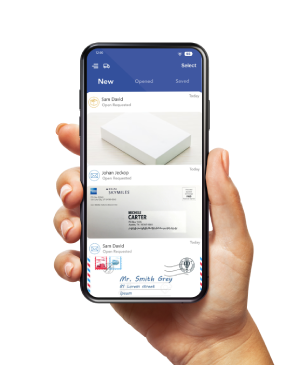
If you move often, a virtual mailbox can give you a consistent receiving address as your location changes. PostScan Mail receives items at your selected location and shows images of incoming mail online.
You can request content scans or arrange forwarding of originals.
Complete the mailbox setup before redirecting mail. For receiving USPS mail through a U.S. commercial mail receiving agency, Form 1583 authorizes the provider to receive mail for you.
It is separate from Form 3575, which requests a USPS change of address.
Give senders the full provider-approved address, including your private mailbox number.
Check scan, storage, forwarding, and postage charges before choosing a plan. A mailing address does not automatically satisfy residential or operating-address requirements.
Complete Both Parts of Your Address Change
File your USPS request, finish verification, and save the confirmation. Then work through your sender checklist so correspondence reaches the new address directly before forwarding ends.
If you need to manage mail between moves, explore PostScan Mail’s virtual mailbox service and confirm that the receiving location and handling options fit your needs.
Access & Manage Your Postal Mail
Anywhere Anytime!
Receive mail anywhere, on any device.
We offer 1000+ mailing addresses for both personal and business use.