The best virtual mailbox service depends on the address you need, how much mail you receive, and how often you open, scan, or forward it.
Compare the full cost of those actions before choosing a monthly plan.
For included page scans, consider Traveling Mailbox. For business workflows, compare PostScan Mail and US Global Mail.
For location-based plans, compare iPostal1 and Anytime Mailbox. VirtualPostMail also offers bundled content scans and business services.
Compare six virtual mailbox services
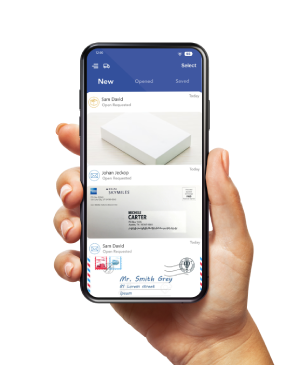
A virtual mailbox receives physical mail at an address and lets you manage it online. An envelope image and a scan of the documents inside are separate services.
The table uses published monthly billing prices, not annual monthly equivalents. Starting prices can vary by address. Shipping, taxes, and additional actions may cost extra.
| Provider | Entry monthly price | Entry allowance | Important qualification |
|---|---|---|---|
| PostScan Mail | From $10 Starter | 30 letters or packages; 1 recipient | Content scans cost extra on Starter |
| iPostal1 | From $9.99 personal; $14.99 business | 30 mail items on either entry plan | Business-name mail requires the appropriate plan; content scans cost extra |
| Anytime Mailbox | From $4.99 at selected addresses | Set by the location and plan | Compare the chosen mail center’s allowances and action fees |
| Traveling Mailbox | $15 Basic | 40 envelopes; 35 page scans; 3 recipients | Count pages, not just opened envelopes |
| VirtualPostMail | $20 Starter | 25 envelope scans; 10 content scans; 2 recipients | Each included content scan covers up to 10 pages |
| US Global Mail | From $65 Scale | 10 recipient names; 1 account user | Scanning limits and fair-use terms apply; price varies by address |
An advertised minimum is a starting point. Ask for the plan and fee schedule for the exact address you’ll use.
Which virtual mailbox service fits your needs
PostScan Mail for mail management and connected workflows
PostScan Mail suits users who want online mail management alongside AI summaries, Zapier workflows, Developer API access, and management of multiple addresses.
Review the virtual mailbox service to match those functions to your workflow.
Starter begins at $10 per month. Standard begins at $20 and includes five Open & Scan requests per month. Each included request covers up to 10 pages.
Annual plans have different scan and recipient allowances, so compare the billing options separately.
The tradeoff is that the lowest subscription does not include content scanning.
Processing, package handling, and pickup also depend on the location and service terms.
iPostal1 for personal and business plan choices
iPostal1 separates Virtual Mailing Address plans from Virtual Business Address plans.
Its entry personal plan starts at $9.99 per month, while Business Green starts at $14.99. Both include 30 mail items.
That distinction matters if you want mail addressed to a company. Compare the business plan rather than assuming the lowest personal price covers that use.
Content scanning is an additional action. The published single-order price is $2.25 for one envelope containing up to 10 pages.
Prepaid bundles can reduce the cost. Check location-specific pickup fees and whether international forwarding is available.
Anytime Mailbox for choosing a local mail center
Anytime Mailbox lets you select an address and then choose the services offered there. Its published minimum is $4.99 per month at selected locations. The Virginia location directory illustrates the variation, with different starting prices across nearby addresses.
Use it when finding a particular location is a priority. Compare incoming-item allowances, content scans, recipients, storage, and pickup for that address.
The tradeoff is that a network-wide starting price does not describe every operator’s plan. Confirm the services you need at the mail center you select.
Traveling Mailbox for an included page allowance
Traveling Mailbox’s $15 Basic plan includes 40 incoming envelopes, 35 page scans, and three recipients.
Consider it if you regularly need to read letter contents online.
Its unit is the page. Opening five envelopes containing two pages each uses 10 page scans. Opening five 10-page envelopes uses 50.
The published overage is $0.50 per page. Forwarding costs postage plus $2 per shipment.
Compare those charges with your expected page count and forwarding frequency before deciding that included scanning covers your needs.
VirtualPostMail for bundled envelope content scans
VirtualPostMail’s Starter plan is $20 per month and includes 25 envelope scans, 10 content scans, and two recipients. Each content scan covers up to 10 pages.
This can suit a reader whose mail contains several pages per envelope.
Compare the envelope-based allowance with providers that count individual pages.
VirtualPostMail also advertises registered-agent service with mailbox plans.
Check state coverage and enrollment terms. Its virtual mailbox, TruLease, and TruResidence products serve different address needs; do not assume a mailbox subscription includes a lease or utility bill.
US Global Mail for multiple recipients and business operations
US Global Mail’s Scale plan starts at $65 per month with monthly billing, or $49 per month with annual billing. The price varies by address.
Scale includes 10 recipient names and one account user. Its published features include content scanning and AI summaries.
Review the scan allowance and fair-use policy rather than treating the subscription as unlimited processing.
Consider it when several names or entities receive mail under one operator’s account. If multiple people need account access, compare the Teams plan and user permissions.
Recipient names and account users are different allowances.
Compare total cost using the same mail volume
A lower subscription can cost more once you add content scans. Use the same workload when comparing quotes.
Here is an illustration using 20 incoming letters, one recipient, and five envelopes opened and scanned with two pages each.
It assumes the listed entry address price, monthly billing, and no forwarding, storage overages, check deposits, shredding, or taxes.
| Plan | Calculation for this workload | Monthly subtotal |
|---|---|---|
| PostScan Mail Starter | $10 subscription plus five $2 scan requests | $20.00 |
| iPostal1 personal Green | $9.99 plus five $2.25 single scan orders | $21.24 |
| VirtualPostMail Starter | $20; the workload fits its 10-content-scan allowance | $20.00 |
iPostal1 also offers five scan or shred orders for $10 prepaid, which would produce a $19.99 subtotal for this example if you buy that bundle. Its bundles have their own terms. For business-name mail, use its business subscription price instead.
At PostScan Mail’s listed starting prices, the Starter calculation equals Standard’s $20 subscription, which includes five Open & Scan requests and a larger incoming-mail allowance. Check the current plans and any additional fees before choosing.
These are workload examples, not quotes for every address. They compare mail receipt and scanning only. Add actual shipping and handling to compare forwarding costs.
What to check before choosing a virtual mailbox
Confirm the address works for your intended use
Ask the relevant institution what kind of address it requires. A mailing address, principal business location, registered-agent address, and proof of residence can serve different purposes.
Before filing business documents or applying for an account, confirm the selected address is accepted and what supporting documents are required. A street-address format alone does not guarantee approval.
Check physical handling as well as account security
Ask who receives the originals, who may open them, and how staff control access to scans. Review two-factor authentication, encryption, retention, deletion, and disposal procedures.
If a provider makes a SOC 2 or other compliance claim, ask which service, facility, and report it covers. Compare the scope with your requirements. For PostScan Mail, review its published security and privacy controls.
AI summaries can help organize mail. Read the underlying document before acting on an amount, deadline, or instruction.
Separate receipt processing and pickup
A carrier delivery scan does not mean the provider has checked the item into your account or completed a requested content scan.
Ask for the processing schedule and scan turnaround at your location.
Confirm pickup hours, authorization rules, storage periods, and package restrictions.
Online account access does not imply a staffed pickup counter operates 24 hours a day.
Price the actions you expect to use
Add the subscription, incoming-item overages, content scans, extra recipients, storage, disposal, and pickup.
For forwarding, include handling, packaging, and postage. International shipments can also involve import charges and destination restrictions.
Ask for an example quote based on your actual mail volume.
For packages, provide dimensions and weight rather than asking for a general shipping discount.
How to set up a virtual mailbox
- Shortlist addresses that fit your location and intended use. Confirm the complete address format and private mailbox identifier.
- Compare plans using your monthly incoming items, envelopes to open, pages to scan, and recipient names.
- Complete the provider’s authorization and identity verification. For USPS mail delivered through a commercial mail receiving agency, the USPS CMRA rules require PS Form 1583 and acceptable identification.
- Follow the signature-verification process. USPS permits specified witnessing by CMRA personnel or a notary, including qualifying live audio-video procedures. Confirm the provider’s method and any fee.
- After activation, send a test item and confirm receipt, scan quality, and processing. Update senders once the address and account are ready.
Keep a record of your plan, address-specific fees, and cancellation terms. Review the first month’s charges against the workload you expected.
Choose the address and workload before committing
For a scan-focused personal mailbox, compare the included allowances at Traveling Mailbox and VirtualPostMail. For address choice, compare iPostal1 and Anytime Mailbox by location. For business workflows, compare PostScan Mail and US Global Mail with the users and recipients you need.
Start with a plan that covers your current use and review the upgrade path. If PostScan Mail fits your requirements, compare available mailbox locations and confirm the fees, processing, and pickup terms for your selected address before signing up.
Access & Manage Your Postal Mail
Anywhere Anytime!
Receive mail anywhere, on any device.
We offer 1000+ mailing addresses for both personal and business use.