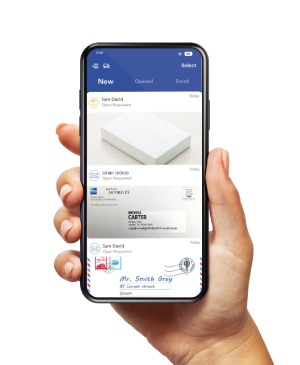
A virtual mailbox for side hustlers gives you a separate mailing address and online tools to manage business mail and packages.
It can be worth it if you want to keep your home address private, need to read mail while away, or receive business deliveries that are hard to manage at home.
If your side business receives almost no physical mail and home delivery meets your needs, another subscription may add little value.
Choose based on a recurring problem and the full monthly cost, not an address that sounds impressive. This guide covers US services.
Table of Contents
How a virtual mailbox works
A virtual mailbox combines a physical receiving address with an online account. Staff receive authorized mail and upload information about incoming items. You review arrivals and request available actions, such as content scanning, forwarding, pickup, or disposal.
An envelope image shows the outside of a letter. To read the enclosed document, you need an open-and-scan request or a scanning rule supported by your plan. Physical receipt and processing happen before the document becomes available online.
PostScan Mail’s virtual mailbox service supports these mail-management actions. Confirm features, handling times, and pickup access at your chosen location. Online access does not mean staff process requests around the clock.
Decide whether your side hustle needs one
A mailbox earns its cost when it solves a problem you encounter often enough to justify the subscription and handling charges.
| Your side work | Mail problem to solve | Feature to check |
|---|---|---|
| Freelance consulting or creative work | Client correspondence mixes with household mail | Approved receiving names, content scans, and document downloads |
| Online selling | Returns or supplier parcels arrive while you are at your day job | Product acceptance, storage costs, and forwarding to the next destination |
| A service business with travel or changing work locations | You cannot collect business letters regularly | Receipt notifications, scan turnaround, and access to originals |
A separate address can keep your residence off eligible customer materials, including proposals and invoices. It does not erase old records or hide your address from a provider, bank, or agency that needs it. Working from home also does not make your business less credible.
For online sellers, receiving a return is only one step. Confirm any inspection or other handling separately, and keep order matching, refunds, and inventory decisions in your selling workflow. PostScan Mail’s returns and reshipping service explains the receiving and routing options to evaluate.
Compare a virtual mailbox with home delivery and a PO Box
Home delivery may work if you are comfortable sharing the address where required and can manage arrivals. A PO Box provides a separate mailing address and lets you pick up mail yourself.
Some participating USPS locations offer PO Box Street Addressing, including eligible private-carrier package deliveries. A blanket claim that PO Boxes cannot receive packages is incorrect.
A virtual mailbox adds remote viewing and the handling you request. Compare that benefit with the actual services, access hours, and costs of a nearby PO Box. Neither option guarantees acceptance for every business-address purpose.
Calculate the cost of the mail you expect
Start with the subscription, then add the actions you will use. Compare scan allowances, recipient names, forwarding handling, postage, storage, and pickup charges. Check the amount billed today when an annual plan advertises a monthly equivalent.
The example below uses PostScan Mail’s published starting monthly Starter price and listed additional-service fees. It assumes six incoming letters within the plan allowance, three paid content scans of no more than 10 pages each, and one forwarding shipment containing three letters. It assumes no storage charges or other services. Your selected location and usage may produce a different total.
| Cost component | Calculation | Example amount |
|---|---|---|
| Monthly subscription | Published starting Starter price | $10.00 |
| Three content scans | 3 × $2.00 | $6.00 |
| Forward three letters together | $2.00 first item + 2 × $0.50 | $3.00 |
| Subtotal before carrier postage | $10.00 + $6.00 + $3.00 | $19.00 |
This is an illustration, not a quote or a prediction of your mail volume. Carrier postage is additional. Check the selected location’s plan allowances and fee schedule, including any setup or verification costs, before subscribing.
Estimate a quiet month and a busy month. If scans or parcels dominate your costs, compare another plan’s inclusions instead of choosing by base price alone.
Set up the mailbox before sharing the address
1. Confirm the uses you need
List the mail you expect and where you plan to publish the address. A correspondence address, physical operating address, and registered agent designation have different purposes. Check state, bank, or platform requirements for the exact field you intend to use. A mailbox subscription alone does not appoint a registered agent.
2. Choose the location and receiving names
Compare suitable PostScan Mail locations for handling, support, pickup access, and costs. Confirm the names authorized to receive mail, including any business or trade names your clients use. Do not assume every name fits within one recipient allowance.
3. Complete mail authorization and identity checks
US commercial mail receiving agencies use USPS Form 1583 to authorize mail receipt. Follow the current form and provider process for acceptable photo and address identification and signature verification. A separate mailing address does not remove these identity requirements.
4. Send a test letter and update selected senders
Use the exact address format, including the required mailbox designation. Test receipt, a content scan, and access to the file before updating clients and suppliers. If you need originals, also confirm forwarding or pickup.
Update the correspondence details you intend to change. A postal forwarding request does not automatically update a bank, business registry, client account, or tax agency.
Build a mail routine around your work schedule
Notifications help only if you review and act on them. Choose a review frequency that fits the documents you receive. Check deadline-sensitive items more often than routine correspondence.
For example, a freelance designer could review arrivals during an after-work admin session, request scans of client letters, and add any deadlines to a task calendar. That is a suggested routine, not a service-speed claim.
For each item, decide whether you need a scan, the original, or a disposal option. Download records you need and check retention requirements before discarding originals. Resolve stored items before avoidable charges build up.
Use a unique password and available account protections. Review PostScan Mail’s published security controls, and ask the selected location who can handle physical items and view documents. Match access permissions to anyone helping with bookkeeping or admin work.
If your side work pauses, review the subscription terms before canceling. Download needed files and plan how future mail will reach you. PostScan Mail’s terms state that online account access ends at closure. For a US CMRA mailbox, a standard USPS change-of-address order is not the exit route; arrange remailing with the provider and update senders.
Choose the service around a need you can name
A virtual mailbox can help you manage business mail alongside a day job. Compare the full cost with the problem it solves, confirm how you’ll use the address, and test the handling process before sharing it widely.
Start with the mail you receive today. Add services when your side business needs them.
Access & Manage Your Postal Mail
Anywhere Anytime!
Receive mail anywhere, on any device.
We offer 1000+ mailing addresses for both personal and business use.