Closing the office for Christmas does not stop invoices, customer letters, or packages from arriving. Virtual mail solutions for business let you review physical mail online and request scanning, forwarding, storage, or disposal while your team is away.
The main benefit is visibility: you can decide what needs attention without going to the office.
To make that useful, set up the address before your holiday break, confirm the location’s processing schedule, and assign someone to review incoming items.
Table of Contents
What Are Virtual Mail Solutions for Business?
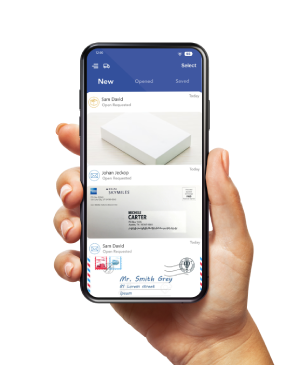
A virtual mailbox connects a physical mailing address with an online account.
Staff at the receiving location accept your mail and upload images of envelopes or package labels.
You review those images and request the next action, such as opening a letter and scanning its contents.
PostScan Mail’s virtual mailbox service supports this process for postal mail and packages.
Your account lets you manage physical correspondence remotely; it doesn’t turn every arriving letter into an immediately available digital document.
Why a Virtual Mailbox Helps During Christmas
Review Important Letters While the Office Is Closed
A letter addressed to your business can arrive when the person who normally opens it is on vacation.
An exterior image helps you identify the sender and request a content scan when needed.
Once the scan is available, you can review it and route the information through your company’s usual approval process.
For example, imagine a small agency receiving a supplier invoice during its Christmas closure.
Its designated mail reviewer requests a scan, checks the due date, and sends the document to the approved finance contact.
This hypothetical workflow keeps the invoice visible without requiring someone to visit the office.
Manage Packages Without Receiving Them at an Empty Office
A subscribed mailing location can receive eligible packages while your business premises are unattended.
Then arrange pickup or forwarding based on your plans.
Confirm the location’s holiday receiving hours, package limits, and storage terms before directing deliveries there.
Forward the Items You Actually Need
Some letters only need a digital review; others require the original.
Choosing item by item can reduce unnecessary forwarding.
The result depends on your mail volume, service fees, and shipping costs, so compare the total expense rather than assuming a fixed percentage of savings.
Create a Holiday Mail Handling Plan
Decide how you will handle common items before your staff take time off.
Use a simple plan like this and adapt it to your business’s document requirements:
| Mail Item | Suggested Action | Who Follows Up |
| Invoice or supplier letter | Request a scan; review dates and required action. | Finance or the purchasing contact. |
| Customer correspondence | Scan when needed; route it through your support process. | The assigned customer contact. |
| Document requiring an original | Confirm the destination and request forwarding or pickup. | The person responsible for the transaction. |
| Package | Check contents and urgency; arrange storage, pickup, or forwarding. | The designated package contact. |
| Unwanted mail | Recycle or request shredding as appropriate to the contents. | The authorized mail reviewer. |
Assign a primary reviewer and a backup, with a check-in schedule that fits your business.
Record the local provider’s contact details, the correct forwarding addresses, and who can approve paid requests.
Treat time-sensitive correspondence as an action item with a named owner.
Set Up Your Virtual Mailbox Before the Holiday Break
Complete the setup and test the process before relying on it during an office closure:
- Choose the address and plan. Check local receiving and pickup hours, holiday closures, package restrictions, and the allowances for your expected December volume.
- Complete the required verification. For receiving USPS mail through a U.S. commercial mail receiving agency, USPS requires Form 1583 and two forms of identification, including a photo ID. Follow PostScan Mail’s instructions to complete and verify the form.
- Confirm approved recipient names. Make sure the business and any additional names receiving mail match your account setup and required documentation.
- Update priority senders. Give suppliers, customers, and other relevant contacts the complete mailing address, including the assigned private mailbox number. Completing Form 1583 alone does not redirect mail from your old address.
- Test the workflow. Confirm that an item appears in your account, a scan request works, notifications reach the right person, and your team knows how to request an original.
Avoid making the address change your final task before leaving.
Allow time for verification, sender updates, delivery, and a trial run.
Continue checking mail at your previous address during the transition.
Plan Around Holiday Processing and Shipping Times
Online access and physical processing run on different schedules.
You can review available images remotely, while receiving, opening, scanning, packing, and carrier collection depend on the location’s operations.
PostScan Mail’s support guidance says it aims to upload incoming mail and packages within one business day of arrival.
That refers to the initial upload after physical receipt, not an instant content scan or a guaranteed holiday turnaround.
Ask your location about Christmas and New Year closures and the timing of requested services.
For an item you need physically, work backward from your deadline: allow for local processing, preparation for forwarding, the carrier’s next pickup, and transit to the destination.
Confirm the address where you will actually be available to receive it.
For Christmas 2026, USPS recommends sending domestic shipments within the contiguous United States by December 17 for Ground Advantage and First-Class Mail, December 18 for Priority Mail, and December 19 for Priority Mail Express.
These are recommended send-by dates for expected delivery before December 25, subject to origin, destination, acceptance time, and other conditions.
Check the USPS holiday shipping deadlines for your route, and allow additional time before carrier handoff for any virtual mailbox processing. Forwarding a package through a mailbox provider adds a preparation stage to the shipment.
Consolidation also takes time. PostScan Mail’s instructions for combining envelopes and packages ask customers to allow one to two business days for repackaging before the consolidated item is ready for shipment.
Ask whether combining items fits your deadline before requesting it.
Compare the Full Cost of Holiday Mail Management
A monthly subscription is one part of the cost. Estimate your likely December usage and check:
- Incoming mail and package allowances, including fees above the plan limit.
- Open-and-scan allowances, page limits, and additional scanning charges.
- Forwarding and consolidation handling charges, plus carrier postage.
- Physical storage windows for letters and packages, and charges after those windows.
- Additional recipient or user fees, where applicable.
Compare the same location and billing term. PostScan Mail’s pricing distinguishes some storage allowances by monthly versus annual billing, so confirm the terms for your selected subscription.
Before a long break, check stored items and decide which to forward, collect, or dispose of.
Use a practical comparison: subscription plus expected usage fees and shipping, weighed against your current collection trips, staff time, and forwarding expense.
A plan with a higher base price may fit better if its included allowances match your actual usage.
Protect Business Documents While Working Remotely
PostScan Mail lists encryption and two-factor authentication as security features.
Enable two-factor authentication, use a unique password, and limit access to only those who need it. Store downloaded scans in your approved business systems.
Confirm how staff access works before assigning holiday coverage.
PostScan Mail distinguishes recipient names from users with their own mailbox views.
An added name does not automatically give a colleague access to every existing item.
Check that the backup reviewer has the access needed for the job.
Set a retention rule before requesting disposal. Recycle non-sensitive unwanted mail where appropriate, and request shredding for documents that require secure destruction once your business no longer needs them. Keep originals that are still required for a transaction or record.
Get Your Business Mail Ready for Christmas
A useful holiday setup combines a suitable address, completed verification, clear responsibilities, and realistic processing times.
It lets your team review mail while away and decide which physical items need attention.
Browse PostScan Mail locations to compare addresses and plans.
Before signing up, confirm holiday hours, scanning and forwarding procedures, storage terms, and package acceptance with the location you choose.
Then test the process before your office closes.
Access & Manage Your Postal Mail
Anywhere Anytime!
Receive mail anywhere, on any device.
We offer 1000+ mailing addresses for both personal and business use.



![Optimize Your Dropshipping Workflow with PostScan Mail [Ultimate Guide]](https://d272m8pnbh08wa.cloudfront.net/wp-content/uploads/2025/05/Optimize-Your-Dropshipping-Workflow-with-PostScan-Mail-1.png)